
| |
| |||||||
Log-Analyse und Auswertung: weißer bildschirm warte verbindung hergestelltWindows 7 Wenn Du Dir einen Trojaner eingefangen hast oder ständig Viren Warnungen bekommst, kannst Du hier die Logs unserer Diagnose Tools zwecks Auswertung durch unsere Experten posten. Um Viren und Trojaner entfernen zu können, muss das infizierte System zuerst untersucht werden: Erste Schritte zur Hilfe. Beachte dass ein infiziertes System nicht vertrauenswürdig ist und bis zur vollständigen Entfernung der Malware nicht verwendet werden sollte.XML. |
 |
| |
 25.04.2012, 06:47
| #1 |
| /// Malwareteam    |  weißer bildschirm warte verbindung hergestellt Welcher Benutzer ist angemeldet?
__________________ Kein Asylrecht für Trojaner!  Proud Member of UNITE Hinweis: Ich bin nur werktags erreichbar! Anfragen über PM werden ignoriert! Du bist zufrieden mit uns? Dann unterstütze das Trojaner-Board! |
|
25.04.2012, 21:12
| #2 |
 | weißer bildschirm warte verbindung hergestellt Als Administrator (Gibt auch nur den einen Benutzer)
__________________Habe jetzt sogar noch eine neue Meldung bekommen --> Shel-notifire-Icon (oder so ähnlich) |
|
25.04.2012, 23:35
| #3 |
| /// Malwareteam | weißer bildschirm warte verbindung hergestellt Versuch mal nen Rechtsklick auf den Desktop--view-->show icons
__________________
__________________ |
|
26.04.2012, 19:46
| #4 |
| | weißer bildschirm warte verbindung hergestellt Hat funktioniert alles wieder da auf dem Desktop. Ich mache jetzt weiter mit unhide und combofix Okay? |
|
26.04.2012, 22:37
| #5 |
| /// Malwareteam | weißer bildschirm warte verbindung hergestellt Genau, du hast es erfasst! 
__________________ Kein Asylrecht für Trojaner! Proud Member of UNITE Hinweis: Ich bin nur werktags erreichbar! Anfragen über PM werden ignoriert! Du bist zufrieden mit uns? Dann unterstütze das Trojaner-Board! |
|
29.04.2012, 20:13
| #6 |
| /// Malwareteam | weißer bildschirm warte verbindung hergestellt Hallo, benötigst Du noch weiterhin Hilfe ? Sollte ich innerhalb der nächsten 24 Stunden keine Antwort von dir erhalten, werde ich dein Thema aus meinen Abos nehmen und bekomme dadurch keine Nachricht über neue Antworten. Das Verschwinden der Symptome bedeutet nicht, dass dein System schon sauber ist
__________________ --> weißer bildschirm warte verbindung hergestellt |
|
01.05.2012, 22:35
| #7 |
| /// Malwareteam | weißer bildschirm warte verbindung hergestellt Fehlende Rückmeldung Dieses Thema wurde aus den Abos gelöscht. Somit bekomm ich keine Benachrichtigung über neue Antworten. PM an mich falls Du denoch weiter machen willst. Hinweis: Das Verschwinden der Symptome bedeutet nicht, dass Dein Rechner schon sauber ist. Jeder andere bitte hier klicken und einen eigenen Thread erstellen
__________________ Kein Asylrecht für Trojaner! Proud Member of UNITE Hinweis: Ich bin nur werktags erreichbar! Anfragen über PM werden ignoriert! Du bist zufrieden mit uns? Dann unterstütze das Trojaner-Board! |
|
08.05.2012, 12:45
| #8 |
| /// Malwareteam | weißer bildschirm warte verbindung hergestellt Versuche es im abgesicherten Modus mit Netzwerktreibern! Abgesicherter Modus zur Bereinigung
Bekommst du hier eine Verbindung? Wie genau gehst du ins Internet? DSL? Kabelverbindung? Andere? Welche Hardware ist eingesetzt? (z.b. Router, Splitter, DSL-/Kabelmodem, usw)
__________________ Kein Asylrecht für Trojaner! Proud Member of UNITE Hinweis: Ich bin nur werktags erreichbar! Anfragen über PM werden ignoriert! Du bist zufrieden mit uns? Dann unterstütze das Trojaner-Board! |
|
08.05.2012, 15:25
| #9 |
| /// Malwareteam | weißer bildschirm warte verbindung hergestellt Scan mit TDSS-Killer Lese bitte folgende Anweisungen genau. Wir wollen hier noch nichts "fixen" sondern nur einen Scan Report sehen. Downloade dir bitte TDSSKiller.exe und speichere diese Datei auf dem Desktop
__________________ Kein Asylrecht für Trojaner! Proud Member of UNITE Hinweis: Ich bin nur werktags erreichbar! Anfragen über PM werden ignoriert! Du bist zufrieden mit uns? Dann unterstütze das Trojaner-Board! |
|
02.05.2012, 19:00
| #10 |
| | weißer bildschirm warte verbindung hergestellt So bin wiedr aus dem Urlaub zurück. Hier die Log File von unhide Unhide by Lawrence Abrams (Grinler) Bleeping Computer - Computer Help and Discussion Copyright 2008-2012 BleepingComputer.com More Information about Unhide.exe can be found at this link: Unhide.exe - A introduction as to what this program does Program started at: 05/02/2012 11:25:46 PM Windows Version: Windows XP Please be patient while your files are made visible again. Processing the A:\ drive Finished processing the A:\ drive. 0 files processed. Processing the C:\ drive Finished processing the C:\ drive. 219199 files processed. Processing the F:\ drive Finished processing the F:\ drive. 139 files processed. Processing the G:\ drive Finished processing the G:\ drive. 3008 files processed. Processing the H:\ drive Finished processing the H:\ drive. 101 files processed. The C:\DOKUME~1\ADMINI~1\LOKALE~1\Temp\smtmp\ folder does not exist!! Unhide cannot restore your missing shortcuts!! Please see this topic in order to learn how to restore default Start Menu shortcuts: Unhide.exe - A introduction as to what this program does Searching for Windows Registry changes made by FakeHDD rogues. - Checking HKCU\SOFTWARE\Microsoft\Windows\CurrentVersion\policies\Explorer - Checking HKCU\SOFTWARE\Microsoft\Windows\CurrentVersion\policies\System - Checking HKCU\Software\Microsoft\Windows\CurrentVersion\Explorer\Advanced No registry changes detected. Restarting Explorer.exe in order to apply changes. Program finished at: 05/02/2012 11:40:19 PM Execution time: 0 hours(s), 14 minute(s), and 33 seconds(s) ComboFix kann ich nicht ausführen Ich habe die Meldung, das der PC nicht über die "Microsoft-Wiederherstellungskonsole" verfügt. Und ob ich das online runterladen will?? Soll ich das machen?? Aktuell ist der PC NICHT online |
|
03.05.2012, 13:34
| #11 |
| /// Malwareteam | weißer bildschirm warte verbindung hergestellt CF: Wiederherstellungskonsole installieren Gehe auf die Mircosoft Seite => http://support.microsoft.com/?scid=kb%3Bde%3B310994&x=21&y=12 Wähle den Download, der für dein Betriebssystem bestimmt ist: Hinweis: Für WinXP Sp3 wähle die Sp2 Version.  Lade die Datei herunter und speichere diese mit dem original Namen, neben ComboFix.exe ab. 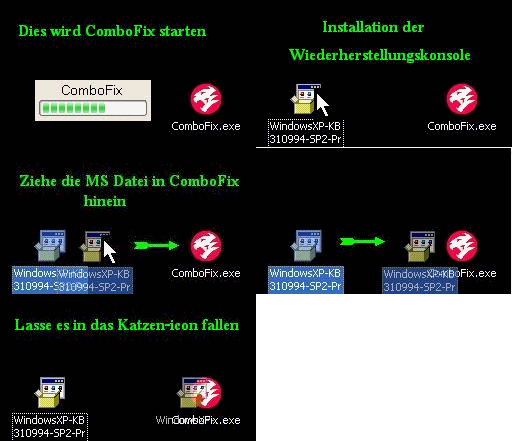 Nun schließe alle offenen Programme und Fenster, inklusive der Antiviren und Antimalware Programme. Dies ist notwendig, damit kein Program den Suchlauf von ComboFix behindert.
__________________ Kein Asylrecht für Trojaner! Proud Member of UNITE Hinweis: Ich bin nur werktags erreichbar! Anfragen über PM werden ignoriert! Du bist zufrieden mit uns? Dann unterstütze das Trojaner-Board! |
|
03.05.2012, 20:46
| #12 |
| | weißer bildschirm warte verbindung hergestellt So habe ich gemacht..... das Combofix Icon ist nun wech vom Desktop und die Combofix text Datei gibbet nicht unter dem Pfad.... Ich habe einen Combofix Ordner, wenn ich den öffne habe ich da "NircmdB" was ich anklicken kann. Wenn ich das mache macht sich ein pop up auf wo ich wählen kann zwichen "Copy to windows Directory" und "ok" was soll ich hier machen?? |
|
04.05.2012, 06:12
| #13 |
| /// Malwareteam | weißer bildschirm warte verbindung hergestellt Zweiter Versuch: Combofix Combofix darf ausschließlich ausgeführt werden, wenn dies von einem Team Mitglied angewiesen wurde!Downloade dir bitte Combofix von einem dieser Downloadspiegel Link 1 Link 2 WICHTIG - Speichere Combofix auf deinem Desktop
Starte die Combofix.exe und folge den Anweisungen auf dem Bildschirm.
Wenn Combofix fertig ist, wird es eine Logfile erstellen. Bitte poste die C:\Combofix.txt in deiner nächsten Antwort.
__________________ Kein Asylrecht für Trojaner! Proud Member of UNITE Hinweis: Ich bin nur werktags erreichbar! Anfragen über PM werden ignoriert! Du bist zufrieden mit uns? Dann unterstütze das Trojaner-Board! |
|
05.05.2012, 11:18
| #14 |
| | weißer bildschirm warte verbindung hergestellt Combofix Logfile: Code:
ATTFilter ComboFix 12-05-05.05 - Administrator 05.05.2012 19:51:56.1.1 - x86
Microsoft Windows XP Professional 5.1.2600.2.1252.49.1031.18.1535.1106 [GMT 2:00]
ausgeführt von:: c:\dokumente und einstellungen\Administrator\Desktop\ComboFix.exe
Benutzte Befehlsschalter :: c:\dokumente und einstellungen\Administrator\Desktop\WindowsXP-KB310994-SP2-Pro-BootDisk-DEU.exe
AV: AntiVir Desktop *Disabled/Outdated* {AD166499-45F9-482A-A743-FDD3350758C7}
.
.
(((((((((((((((((((((((((((((((((((( Weitere Löschungen ))))))))))))))))))))))))))))))))))))))))))))))))
.
.
c:\dokumente und einstellungen\Administrator\Anwendungsdaten\PriceGong
c:\dokumente und einstellungen\Administrator\Anwendungsdaten\PriceGong\Data\1.xml
c:\dokumente und einstellungen\Administrator\Anwendungsdaten\PriceGong\Data\a.xml
c:\dokumente und einstellungen\Administrator\Anwendungsdaten\PriceGong\Data\b.xml
c:\dokumente und einstellungen\Administrator\Anwendungsdaten\PriceGong\Data\c.xml
c:\dokumente und einstellungen\Administrator\Anwendungsdaten\PriceGong\Data\d.xml
c:\dokumente und einstellungen\Administrator\Anwendungsdaten\PriceGong\Data\e.xml
c:\dokumente und einstellungen\Administrator\Anwendungsdaten\PriceGong\Data\f.xml
c:\dokumente und einstellungen\Administrator\Anwendungsdaten\PriceGong\Data\g.xml
c:\dokumente und einstellungen\Administrator\Anwendungsdaten\PriceGong\Data\h.xml
c:\dokumente und einstellungen\Administrator\Anwendungsdaten\PriceGong\Data\i.xml
c:\dokumente und einstellungen\Administrator\Anwendungsdaten\PriceGong\Data\J.xml
c:\dokumente und einstellungen\Administrator\Anwendungsdaten\PriceGong\Data\k.xml
c:\dokumente und einstellungen\Administrator\Anwendungsdaten\PriceGong\Data\l.xml
c:\dokumente und einstellungen\Administrator\Anwendungsdaten\PriceGong\Data\m.xml
c:\dokumente und einstellungen\Administrator\Anwendungsdaten\PriceGong\Data\mru.xml
c:\dokumente und einstellungen\Administrator\Anwendungsdaten\PriceGong\Data\n.xml
c:\dokumente und einstellungen\Administrator\Anwendungsdaten\PriceGong\Data\o.xml
c:\dokumente und einstellungen\Administrator\Anwendungsdaten\PriceGong\Data\p.xml
c:\dokumente und einstellungen\Administrator\Anwendungsdaten\PriceGong\Data\q.xml
c:\dokumente und einstellungen\Administrator\Anwendungsdaten\PriceGong\Data\r.xml
c:\dokumente und einstellungen\Administrator\Anwendungsdaten\PriceGong\Data\s.xml
c:\dokumente und einstellungen\Administrator\Anwendungsdaten\PriceGong\Data\t.xml
c:\dokumente und einstellungen\Administrator\Anwendungsdaten\PriceGong\Data\u.xml
c:\dokumente und einstellungen\Administrator\Anwendungsdaten\PriceGong\Data\v.xml
c:\dokumente und einstellungen\Administrator\Anwendungsdaten\PriceGong\Data\w.xml
c:\dokumente und einstellungen\Administrator\Anwendungsdaten\PriceGong\Data\x.xml
c:\dokumente und einstellungen\Administrator\Anwendungsdaten\PriceGong\Data\y.xml
c:\dokumente und einstellungen\Administrator\Anwendungsdaten\PriceGong\Data\z.xml
c:\dokumente und einstellungen\Administrator\Anwendungsdaten\Toolbar4
c:\dokumente und einstellungen\Administrator\Anwendungsdaten\Toolbar4\{977AE9CC-AF83-45E8-9E03-E2798216E2D5}\cache\078441d787a582adce0e7e2171812479
c:\dokumente und einstellungen\Administrator\Anwendungsdaten\Toolbar4\{977AE9CC-AF83-45E8-9E03-E2798216E2D5}\cache\33f11277e5483b8207cde8ef71134210
c:\dokumente und einstellungen\Administrator\Anwendungsdaten\Toolbar4\{977AE9CC-AF83-45E8-9E03-E2798216E2D5}\cache\4d2a15efb49fc02fe1ea1ba7cc36c7e8
c:\dokumente und einstellungen\Administrator\Anwendungsdaten\Toolbar4\{977AE9CC-AF83-45E8-9E03-E2798216E2D5}\cache\4df398849b3c943ab608c417a877b12f
c:\dokumente und einstellungen\Administrator\Anwendungsdaten\Toolbar4\{977AE9CC-AF83-45E8-9E03-E2798216E2D5}\cache\53399d9b1479c70296a4a7e0bc2ba9d1
c:\dokumente und einstellungen\Administrator\Anwendungsdaten\Toolbar4\{977AE9CC-AF83-45E8-9E03-E2798216E2D5}\cache\60a0e7d31b853c75208a1d53ad68b3b1
c:\dokumente und einstellungen\Administrator\Anwendungsdaten\Toolbar4\{977AE9CC-AF83-45E8-9E03-E2798216E2D5}\cache\7f10799b520eb75068523ed6bc9b4e3b
c:\dokumente und einstellungen\Administrator\Anwendungsdaten\Toolbar4\{977AE9CC-AF83-45E8-9E03-E2798216E2D5}\cache\baf9ede953b14674fdac47589172031c
c:\dokumente und einstellungen\Administrator\Anwendungsdaten\Toolbar4\{977AE9CC-AF83-45E8-9E03-E2798216E2D5}\cache\cf4a2d64dc04acfea07c1e0c7d381ff2
c:\dokumente und einstellungen\Administrator\Anwendungsdaten\Toolbar4\{977AE9CC-AF83-45E8-9E03-E2798216E2D5}\include_files\10df9536f6a94fe378e20591f7829077
c:\dokumente und einstellungen\Administrator\Anwendungsdaten\Toolbar4\{977AE9CC-AF83-45E8-9E03-E2798216E2D5}\include_files\2457f858f97e82eda65e432eac74be80
c:\dokumente und einstellungen\Administrator\Anwendungsdaten\Toolbar4\{977AE9CC-AF83-45E8-9E03-E2798216E2D5}\include_files\f2d989530c2d8ae086261e590356fc71
c:\dokumente und einstellungen\Administrator\Anwendungsdaten\Toolbar4\{977AE9CC-AF83-45E8-9E03-E2798216E2D5}\include_files\f82075d3aae23204b585939f84953196
c:\dokumente und einstellungen\Administrator\Desktop\Internet Explorer.lnk
c:\dokumente und einstellungen\Administrator\Lokale Einstellungen\Anwendungsdaten\wgiiogm.dat
c:\dokumente und einstellungen\Administrator\Lokale Einstellungen\Anwendungsdaten\wgiiogm_nav.dat
c:\dokumente und einstellungen\Administrator\Lokale Einstellungen\Anwendungsdaten\wgiiogm_navps.dat
c:\dokumente und einstellungen\Administrator\Recent\Thumbs.db
c:\dokumente und einstellungen\Administrator\WINDOWS
c:\dokumente und einstellungen\All Users\Anwendungsdaten\TEMP
c:\programme\AskSearch\bin\DeFAultsearch.dll
c:\programme\IMinent Toolbar\tbHElper.dll
C:\Recycle.Bin
c:\recycle.bin\config.bin
C:\SystemData
c:\systemdata\303480F348F1062
C:\timerintray
c:\timerintray\F74D7A6F48F1062
c:\windows\IsUn0407.exe
c:\windows\system\Color
c:\windows\system\Color\AS3400R.ICM
c:\windows\system\Color\AS3400T.ICM
c:\windows\system\Color\AS4400R.ICM
c:\windows\system\Color\AS4400T.ICM
c:\windows\system\Color\AS5400R.ICM
c:\windows\system\Color\AS5400T.ICM
c:\windows\system\Color\ASQ3400R.ICM
c:\windows\system\Color\ASQ3400T.ICM
c:\windows\system\Color\BJC240M7.ICM
c:\windows\system\Color\BJC420LC.ICM
c:\windows\system\Color\BJC42HRP.ICM
c:\windows\system\Color\BJC42HRS.ICM
c:\windows\system\Color\BJC43HRS.ICM
c:\windows\system\Color\BJC43LCS.ICM
c:\windows\system\Color\BJC4550M.ICM
c:\windows\system\Color\BJC600EM.ICM
c:\windows\system\Color\BJC600M7.ICM
c:\windows\system\Color\BJC620CP.ICM
c:\windows\system\Color\BJC800M7.ICM
c:\windows\system\Color\CLC500M7.ICM
c:\windows\system\Color\CLC550SI.ICM
c:\windows\system\Color\EPSPRO36.ICM
c:\windows\system\Color\EPSPRO72.ICM
c:\windows\system\Color\ESC360M.ICM
c:\windows\system\Color\ESC800GL.ICM
c:\windows\system\Color\ESC800IJ.ICM
c:\windows\system\Color\ESCII360.ICM
c:\windows\system\Color\ESCII720.ICM
c:\windows\system\Color\HP12CPS7.ICM
c:\windows\system\Color\HP660CIP.ICM
c:\windows\system\Color\HP870CSE.ICM
c:\windows\system\Color\HP870PIP.ICM
c:\windows\system\Color\HPCLJTPS.ICM
c:\windows\system\Color\HPCLLSJT.ICM
c:\windows\system\Color\HPCLSMM7.ICM
c:\windows\system\Color\HPCPJTM7.ICM
c:\windows\system\Color\HPDJ850W.ICM
c:\windows\system\Color\HPPS_PIP.ICM
c:\windows\system\Color\HPXL3PS7.ICM
c:\windows\system\Color\KCOLEAS1.ICM
c:\windows\system\Color\LEX1020J.ICM
c:\windows\system\Color\LEX2030J.ICM
c:\windows\system\Color\LEX2050C.ICM
c:\windows\system\Color\LEX2070J.ICM
c:\windows\system\Color\P22G18M7.ICM
c:\windows\system\Color\T630R.ICM
c:\windows\system\Color\X863PM07.ICM
c:\windows\system\Color\XL7700M7.ICM
c:\windows\system32\DC120fc7_32.dll
c:\windows\system32\Packet.dll
c:\windows\system32\pthreadVC.dll
c:\windows\system32\wpcap.dll
c:\windows\unin0407.exe
.
.
((((((((((((((((((((((((((((((((((((((( Treiber/Dienste )))))))))))))))))))))))))))))))))))))))))))))))))
.
.
-------\Legacy_NPF
-------\Service_NPF
.
.
((((((((((((((((((((((( Dateien erstellt von 2012-04-05 bis 2012-05-05 ))))))))))))))))))))))))))))))
.
.
2012-04-13 22:50 . 2011-07-13 02:55 2237440 ----a-r- C:\OTLPE.exe
2012-04-13 22:43 . 2012-04-13 22:43 -------- d-----w- C:\_OTL
.
.
.
(((((((((((((((((((((((((((((((((((( Find3M Bericht ))))))))))))))))))))))))))))))))))))))))))))))))))))))
.
2009-03-26 11:49 . 2009-03-26 11:49 7356928 ----a-w- c:\programme\Firefox Setup 3.0.7.exe
2009-03-26 10:31 . 2009-03-26 10:31 30143040 ----a-w- c:\programme\avira_antivir_personal_de.exe
2009-02-23 12:05 . 2009-02-23 12:05 1505160 ----a-w- c:\programme\install_easyshare.exe
2008-06-19 18:46 . 2008-06-19 18:46 118784 ----a-w- c:\programme\mozilla firefox\plugins\MyCamera.dll
2012-03-18 12:30 . 2011-05-09 18:04 97208 ----a-w- c:\programme\mozilla firefox\components\browsercomps.dll
.
.
(((((((((((((((((((((((((((( Autostartpunkte der Registrierung ))))))))))))))))))))))))))))))))))))))))
.
.
*Hinweis* leere Einträge & legitime Standardeinträge werden nicht angezeigt.
REGEDIT4
.
[HKEY_LOCAL_MACHINE\~\Browser Helper Objects\{201f27d4-3704-41d6-89c1-aa35e39143ed}]
2008-08-26 09:32 279944 ----a-w- c:\programme\AskBarDis\bar\bin\askBar.dll
.
[HKEY_LOCAL_MACHINE\~\Browser Helper Objects\{58124A0B-DC32-4180-9BFF-E0E21AE34026}]
2010-07-02 08:54 2607872 ----a-w- c:\programme\IMinent Toolbar\tbcore3.dll
.
[HKEY_LOCAL_MACHINE\SOFTWARE\Microsoft\Internet Explorer\Toolbar]
"{3041d03e-fd4b-44e0-b742-2d9b88305f98}"= "c:\programme\AskBarDis\bar\bin\askBar.dll" [2008-08-26 279944]
"{977AE9CC-AF83-45E8-9E03-E2798216E2D5}"= "c:\programme\IMinent Toolbar\tbcore3.dll" [2010-07-02 2607872]
.
[HKEY_CLASSES_ROOT\clsid\{3041d03e-fd4b-44e0-b742-2d9b88305f98}]
[HKEY_CLASSES_ROOT\TypeLib\{4b1c1e16-6b34-430e-b074-5928eca4c150}]
.
[HKEY_CLASSES_ROOT\clsid\{977ae9cc-af83-45e8-9e03-e2798216e2d5}]
[HKEY_CLASSES_ROOT\TBSB01620.TBSB01620.3]
[HKEY_CLASSES_ROOT\TypeLib\{EC4085F2-8DB3-45a6-AD0B-CA289F3C5D7E}]
[HKEY_CLASSES_ROOT\TBSB01620.TBSB01620]
.
[HKEY_CURRENT_USER\Software\Microsoft\Internet Explorer\Toolbar\Webbrowser]
"{3041D03E-FD4B-44E0-B742-2D9B88305F98}"= "c:\programme\AskBarDis\bar\bin\askBar.dll" [2008-08-26 279944]
"{977AE9CC-AF83-45E8-9E03-E2798216E2D5}"= "c:\programme\IMinent Toolbar\tbcore3.dll" [2010-07-02 2607872]
.
[HKEY_CLASSES_ROOT\clsid\{3041d03e-fd4b-44e0-b742-2d9b88305f98}]
[HKEY_CLASSES_ROOT\TypeLib\{4b1c1e16-6b34-430e-b074-5928eca4c150}]
.
[HKEY_CLASSES_ROOT\clsid\{977ae9cc-af83-45e8-9e03-e2798216e2d5}]
[HKEY_CLASSES_ROOT\TBSB01620.TBSB01620.3]
[HKEY_CLASSES_ROOT\TypeLib\{EC4085F2-8DB3-45a6-AD0B-CA289F3C5D7E}]
[HKEY_CLASSES_ROOT\TBSB01620.TBSB01620]
.
[HKEY_CURRENT_USER\SOFTWARE\Microsoft\Windows\CurrentVersion\Run]
"swg"="c:\programme\Google\GoogleToolbarNotifier\GoogleToolbarNotifier.exe" [2009-05-03 39408]
"NBJ"="c:\programme\Ahead\Nero BackItUp\NBJ.exe" [2005-05-19 1957888]
.
[HKEY_LOCAL_MACHINE\SOFTWARE\Microsoft\Windows\CurrentVersion\Run]
"SoundMan"="SOUNDMAN.EXE" [2004-11-11 67072]
"NeroFilterCheck"="c:\windows\system32\NeroCheck.exe" [2001-07-09 155648]
"RemoteControl"="c:\programme\CyberLink\PowerDVD\PDVDServ.exe" [2004-11-02 32768]
"HostManager"="c:\programme\Gemeinsame Dateien\AOL\1234892461\ee\AOLSoftware.exe" [2006-09-26 50736]
"QuickTime Task"="c:\programme\QuickTime\qttask.exe" [2010-03-17 421888]
"avgnt"="c:\programme\Avira\AntiVir Desktop\avgnt.exe" [2011-02-24 281768]
"Ulead AutoDetector v2"="c:\programme\Gemeinsame Dateien\Ulead Systems\AutoDetector\monitor.exe" [2005-05-23 90112]
"TkBellExe"="c:\programme\Gemeinsame Dateien\Real\Update_OB\realsched.exe" [2009-09-26 198160]
"ProdikeysAutorun"="c:\programme\Creative\Prodikeys\Prodload.exe" [2004-05-21 135168]
"SunJavaUpdateSched"="c:\programme\Gemeinsame Dateien\Java\Java Update\jusched.exe" [2010-05-14 248552]
"Adobe Reader Speed Launcher"="c:\programme\Adobe\Reader 9.0\Reader\Reader_sl.exe" [2012-01-03 37296]
"Adobe ARM"="c:\programme\Gemeinsame Dateien\Adobe\ARM\1.0\AdobeARM.exe" [2012-01-03 843712]
"IMBooster"="c:\programme\Iminent\IMBooster\imbooster.exe" [2011-03-30 1324008]
.
[HKEY_USERS\.DEFAULT\Software\Microsoft\Windows\CurrentVersion\Run]
"CTFMON.EXE"="c:\windows\system32\CTFMON.EXE" [2004-11-11 15360]
.
c:\dokumente und einstellungen\Administrator\Startmenü\Programme\Autostart\
UMAX VistaAccess.lnk - c:\vstascan\vsaccess.exe [2009-3-11 258048]
.
c:\dokumente und einstellungen\All Users\Startmenü\Programme\Autostart\
AOL 9.0 Tray-Symbol.lnk - c:\programme\AOL 9.0a\aoltray.exe [2009-12-14 156784]
Kodak EasyShare Software.lnk - c:\programme\Kodak\Kodak EasyShare software\bin\EasyShare.exe [2008-5-10 282624]
.
[HKEY_LOCAL_MACHINE\software\microsoft\windows nt\currentversion\drivers32]
"midi8"=ProdMidi.dll
"MIDI2"=PRODMI32.DLL
.
[HKLM\~\services\sharedaccess\parameters\firewallpolicy\standardprofile]
"EnableFirewall"= 0 (0x0)
.
[HKLM\~\services\sharedaccess\parameters\firewallpolicy\standardprofile\AuthorizedApplications\List]
"%windir%\\system32\\sessmgr.exe"=
"c:\\Programme\\AOL 9.0\\waol.exe"=
"c:\\Programme\\Kodak\\Kodak EasyShare software\\bin\\EasyShare.exe"=
.
R0 tffsport;M-Systems DiskOnChip-2000;c:\windows\system32\drivers\tffsport.sys [23.02.2009 14:24 149376]
R2 AntiVirSchedulerService;Avira AntiVir Planer;c:\programme\Avira\AntiVir Desktop\sched.exe [26.03.2009 12:31 136360]
S2 gupdate;Google Update Service (gupdate);c:\programme\Google\Update\GoogleUpdate.exe [09.02.2010 21:08 135664]
S3 gupdatem;Google Update-Dienst (gupdatem);c:\programme\Google\Update\GoogleUpdate.exe [09.02.2010 21:08 135664]
S3 NtApm;Herkömmlicher NT APM-Schnittstellentreiber;c:\windows\system32\drivers\NtApm.sys [26.08.2009 13:10 9472]
S3 Prodikeys;Creative Prodikeys Driver;c:\windows\system32\drivers\ProdDrvr.sys [28.11.2009 18:17 14938]
S3 RTL2832U_IRHID;HID Infrared Remote Receiver;c:\windows\system32\drivers\RTL2832U_IRHID.sys [08.03.2010 12:46 37280]
S3 RTL2832UBDA;REALTEK 2832U BDA Driver;c:\windows\system32\drivers\RTL2832UBDA.sys [08.03.2010 12:46 91168]
S3 RTL2832UUSB;REALTEK 2832U USB Driver;c:\windows\system32\drivers\RTL2832UUSB.sys [08.03.2010 12:46 32800]
.
Inhalt des "geplante Tasks" Ordners
.
2012-05-05 c:\windows\Tasks\GoogleUpdateTaskMachineCore.job
- c:\programme\Google\Update\GoogleUpdate.exe [2010-02-09 19:08]
.
2012-05-04 c:\windows\Tasks\GoogleUpdateTaskMachineUA.job
- c:\programme\Google\Update\GoogleUpdate.exe [2010-02-09 19:08]
.
.
------- Zusätzlicher Suchlauf -------
.
uStart Page = hxxp://search.iminent.com/?appId=6BB8A3A9-0A03-4469-BE7C-DC9FA0A04BE5
uSearch Page = hxxp://www.google.com
uSearch Bar = hxxp://www.google.com/ie
mDefault_Search_URL = hxxp://www.google.com/ie
uInternet Connection Wizard,ShellNext = wmplayer.exe //ICWLaunch
uSearchAssistant = hxxp://www.google.com/ie
uSearchURL,(Default) = hxxp://www.google.com/search?q=%s
mSearchAssistant = hxxp://www.google.com/ie
IE: &AOL Toolbar-Suche - c:\programme\aol\aol toolbar 4.0\resources\de-DE\local\search.html
IE: Add to Google Photos Screensa&ver - c:\windows\system32\GPhotos.scr/200
IE: Free YouTube Download - c:\dokumente und einstellungen\Administrator\Anwendungsdaten\DVDVideoSoftIEHelpers\freeyoutubedownload.htm
IE: Free YouTube to MP3 Converter - c:\dokumente und einstellungen\Administrator\Anwendungsdaten\DVDVideoSoftIEHelpers\freeyoutubetomp3converter.htm
IE: Nach Microsoft &Excel exportieren - c:\progra~1\MICROS~2\OFFICE11\EXCEL.EXE/3000
FF - ProfilePath - c:\dokumente und einstellungen\Administrator\Anwendungsdaten\Mozilla\Firefox\Profiles\xv9azwej.default\
FF - prefs.js: browser.search.defaulturl -
FF - prefs.js: browser.search.selectedEngine - SweetIM Search
FF - prefs.js: browser.startup.homepage - hxxp://search.iminent.com/?appId=6bb8a3a9-0a03-4469-be7c-dc9fa0a04be5&lcid=1031&ref=homepage
FF - prefs.js: keyword.URL - chrome://browser-region/locale/region.properties
FF - prefs.js: network.proxy.type - 0
FF - user.js: extensions.BabylonToolbar_i.id - c4cecce1000000000000000c76f14ee0
FF - user.js: extensions.BabylonToolbar_i.hardId - c4cecce1000000000000000c76f14ee0
FF - user.js: extensions.BabylonToolbar_i.instlDay - 15312
FF - user.js: extensions.BabylonToolbar_i.vrsn - 1.5.3.17
FF - user.js: extensions.BabylonToolbar_i.vrsni - 1.5.3.17
FF - user.js: extensions.BabylonToolbar_i.vrsnTs - 1.5.3.1715:24
FF - user.js: extensions.BabylonToolbar_i.prtnrId - babylon
FF - user.js: extensions.BabylonToolbar_i.prdct - BabylonToolbar
FF - user.js: extensions.BabylonToolbar_i.aflt - babclient
FF - user.js: extensions.BabylonToolbar_i.smplGrp - none
FF - user.js: extensions.BabylonToolbar_i.tlbrId - base
FF - user.js: extensions.BabylonToolbar_i.newTab - false
FF - user.js: extensions.BabylonToolbar_i.babTrack - affID=55555
FF - user.js: extensions.BabylonToolbar_i.babExt -
FF - user.js: extensions.BabylonToolbar_i.srcExt -
FF - user.js: extensions.BabylonToolbar_i.instlRef - std
.
- - - - Entfernte verwaiste Registrierungseinträge - - - -
.
URLSearchHooks-{1CFFA392-0898-4b1c-89D1-6E98F9D8EF78} - (no file)
URLSearchHooks-{84FF7BD6-B47F-46F8-9130-01B2696B36CB} - (no file)
BHO-{84FF7BD6-B47F-46F8-9130-01B2696B36CB} - (no file)
AddRemove-Adobe Acrobat 5.0 - c:\windows\ISUN0407.EXE
AddRemove-if40leUninstall - c:\windows\unin0407.exe
AddRemove-PageManager - c:\windows\unin0407.exe
AddRemove-PageType - c:\windows\unin0407.exe
AddRemove-RAILsound 4 free - c:\windows\unin0407.exe
.
.
.
**************************************************************************
.
catchme 0.3.1398 W2K/XP/Vista - rootkit/stealth malware detector by Gmer, GMER - Rootkit Detector and Remover
Rootkit scan 2012-05-05 20:05
Windows 5.1.2600 Service Pack 2 NTFS
.
Scanne versteckte Prozesse...
.
Scanne versteckte Autostarteinträge...
.
Scanne versteckte Dateien...
.
Scan erfolgreich abgeschlossen
versteckte Dateien: 0
.
**************************************************************************
.
--------------------- Durch laufende Prozesse gestartete DLLs ---------------------
.
- - - - - - - > 'winlogon.exe'(604)
c:\windows\system32\sfc_os.dll
.
- - - - - - - > 'explorer.exe'(4008)
c:\progra~1\GEMEIN~1\MICROS~1\WEBCOM~1\10\OWC10.DLL
c:\programme\Gemeinsame Dateien\Microsoft Shared\Web Components\10\1031\OWCI10.DLL
c:\progra~1\GEMEIN~1\MICROS~1\WEBCOM~1\11\OWC11.DLL
c:\programme\Gemeinsame Dateien\Microsoft Shared\Web Components\11\1031\OWCI11.DLL
c:\windows\system32\msls31.dll
c:\windows\system32\shdoclc.dll
c:\windows\system32\msimtf.dll
c:\windows\system32\MSCTF.dll
.
------------------------ Weitere laufende Prozesse ------------------------
.
c:\programme\Avira\AntiVir Desktop\avguard.exe
c:\programme\Gemeinsame Dateien\AOL\ACS\AOLAcsd.exe
c:\programme\Java\jre6\bin\jqs.exe
c:\programme\Avira\AntiVir Desktop\avshadow.exe
c:\programme\Gemeinsame Dateien\Ulead Systems\DVD\ULCDRSvr.exe
c:\programme\Canon\CAL\CALMAIN.exe
c:\windows\system32\wscntfy.exe
c:\windows\system32\wbem\wmiapsrv.exe
c:\windows\SOUNDMAN.EXE
.
**************************************************************************
.
Zeit der Fertigstellung: 2012-05-05 20:15:45 - PC wurde neu gestartet
ComboFix-quarantined-files.txt 2012-05-05 18:15
.
Vor Suchlauf: 20 Verzeichnis(se), 34.561.572.864 Bytes frei
Nach Suchlauf: 19 Verzeichnis(se), 34.414.563.328 Bytes frei
.
WindowsXP-KB310994-SP2-Pro-BootDisk-DEU.exe
[boot loader]
timeout=2
default=multi(0)disk(0)rdisk(0)partition(1)\WINDOWS
[operating systems]
c:\cmdcons\BOOTSECT.DAT="Microsoft Windows Recovery Console" /cmdcons
UnsupportedDebug="do not select this" /debug
multi(0)disk(0)rdisk(0)partition(1)\WINDOWS="Microsoft Windows XP Professional" /noexecute=optin /fastdetect
.
- - End Of File - - 69491D5E9175DD13D7B836B5FCFA9B21
|
|
06.05.2012, 16:10
| #15 |
| /// Malwareteam | weißer bildschirm warte verbindung hergestellt Schritt 1: CF-Script Hinweis für Mitleser: Folgendes ComboFix Skript ist ausschließlich für diesen User in dieser Situtation erstellt worden. Auf keinen Fall auf anderen Rechnern anwenden, das kann andere Systeme nachhaltig schädigen! Lösche die vorhandene Combofix.exe von deinem Desktop und lade das Programm von einem der folgenden Download-Spiegel neu herunter: BleepingComputer.com - ForoSpyware.comund speichere es erneut auf dem Desktop (nicht woanders hin, das ist wichtig)! Drücke die Windows + R Taste --> Notepad (hinein schreiben) --> OK Kopiere nun den Text aus der folgenden Codebox komplett in das leere Textdokument. Code:
ATTFilter REGISTRY::
[-HKEY_LOCAL_MACHINE\~\Browser Helper Objects\{201f27d4-3704-41d6-89c1-aa35e39143ed}]
[-HKEY_LOCAL_MACHINE\~\Browser Helper Objects\{58124A0B-DC32-4180-9BFF-E0E21AE34026}]
[HKEY_LOCAL_MACHINE\SOFTWARE\Microsoft\Internet Explorer\Toolbar]
"{3041d03e-fd4b-44e0-b742-2d9b88305f98}"=-
"{977AE9CC-AF83-45E8-9E03-E2798216E2D5}"=-
[-HKEY_CLASSES_ROOT\clsid\{3041d03e-fd4b-44e0-b742-2d9b88305f98}]
[-HKEY_CLASSES_ROOT\TypeLib\{4b1c1e16-6b34-430e-b074-5928eca4c150}]
[-HKEY_CLASSES_ROOT\clsid\{977ae9cc-af83-45e8-9e03-e2798216e2d5}]
[-HKEY_CLASSES_ROOT\TBSB01620.TBSB01620.3]
[-HKEY_CLASSES_ROOT\TypeLib\{EC4085F2-8DB3-45a6-AD0B-CA289F3C5D7E}]
[-HKEY_CLASSES_ROOT\TBSB01620.TBSB01620]
[HKEY_CURRENT_USER\Software\Microsoft\Internet Explorer\Toolbar\Webbrowser]
"{3041D03E-FD4B-44E0-B742-2D9B88305F98}"=-
"{977AE9CC-AF83-45E8-9E03-E2798216E2D5}"=-
[-HKEY_CLASSES_ROOT\clsid\{3041d03e-fd4b-44e0-b742-2d9b88305f98}]
[-HKEY_CLASSES_ROOT\TypeLib\{4b1c1e16-6b34-430e-b074-5928eca4c150}]
[-HKEY_CLASSES_ROOT\clsid\{977ae9cc-af83-45e8-9e03-e2798216e2d5}]
[-HKEY_CLASSES_ROOT\TBSB01620.TBSB01620.3]
[-HKEY_CLASSES_ROOT\TypeLib\{EC4085F2-8DB3-45a6-AD0B-CA289F3C5D7E}]
[-HKEY_CLASSES_ROOT\TBSB01620.TBSB01620]
[HKLM\~\services\sharedaccess\parameters\firewallpolicy\standardprofile]
"EnableFirewall"= 1 (0x1)
DDS::
uStart Page = hxxp://search.iminent.com/?appId=6BB8A3A9-0A03-4469-BE7C-DC9FA0A04BE5
FIREFOX::
FF - ProfilePath - c:\dokumente und einstellungen\Administrator\Anwendungsdaten\Mozilla\Firefox\Profiles\xv9azwej.default\
FF - prefs.js: browser.search.defaulturl -
FF - prefs.js: browser.search.selectedEngine - SweetIM Search
FF - prefs.js: browser.startup.homepage - hxxp://search.iminent.com/?appId=6bb8a3a9-0a03-4469-be7c-dc9fa0a04be5&lcid=1031&ref=homepage
FF - prefs.js: keyword.URL - chrome://browser-region/locale/region.properties
FF - prefs.js: network.proxy.type - 0
FF - user.js: extensions.BabylonToolbar_i.id - c4cecce1000000000000000c76f14ee0
FF - user.js: extensions.BabylonToolbar_i.hardId - c4cecce1000000000000000c76f14ee0
FF - user.js: extensions.BabylonToolbar_i.instlDay - 15312
FF - user.js: extensions.BabylonToolbar_i.vrsn - 1.5.3.17
FF - user.js: extensions.BabylonToolbar_i.vrsni - 1.5.3.17
FF - user.js: extensions.BabylonToolbar_i.vrsnTs - 1.5.3.1715:24
FF - user.js: extensions.BabylonToolbar_i.prtnrId - babylon
FF - user.js: extensions.BabylonToolbar_i.prdct - BabylonToolbar
FF - user.js: extensions.BabylonToolbar_i.aflt - babclient
FF - user.js: extensions.BabylonToolbar_i.smplGrp - none
FF - user.js: extensions.BabylonToolbar_i.tlbrId - base
FF - user.js: extensions.BabylonToolbar_i.newTab - false
FF - user.js: extensions.BabylonToolbar_i.babTrack - affID=55555
FF - user.js: extensions.BabylonToolbar_i.babExt -
FF - user.js: extensions.BabylonToolbar_i.srcExt -
FF - user.js: extensions.BabylonToolbar_i.instlRef - std
FOLDER::
c:\programme\AskBarDis
c:\programme\IMinent Toolbar
Wichtig:

Schritt 2: MBAM Downloade Dir bitte Malwarebytes
__________________ Kein Asylrecht für Trojaner! Proud Member of UNITE Hinweis: Ich bin nur werktags erreichbar! Anfragen über PM werden ignoriert! Du bist zufrieden mit uns? Dann unterstütze das Trojaner-Board! |
|
| Themen zu weißer bildschirm warte verbindung hergestellt |
| benötige, betriebssystem, bildschirm, brauche, datei, disable, disabletaskmgr, durchgeführt, hallo zusammen, hochfahren, logon, mozilla, reboot, rechner, richtig, scan, scann, shell, theme, themen, userinit, verbindung, weiße, weißer, weißer bildschirm warte verbindung hergestellt, winlogon, zusammen |


 Hybrid-Darstellung
