
| |
| |||||||
Alles rund um Windows: Win10: Flugmodus lässt sich nicht ausschalten - kein Internet - keine NetzwerkadapterWindows 7 Hilfe zu allen Windows-Betriebssystemen: Windows XP, Windows Vista, Windows 7, Windows 8(.1) und Windows 10 / Windows 11- als auch zu sämtlicher Windows-Software. Alles zu Windows 10 ist auch gerne willkommen. Bitte benenne etwaige Fehler oder Bluescreens unter Windows mit dem Wortlaut der Fehlermeldung und Fehlercode. Erste Schritte für Hilfe unter Windows. |
 |
 20.12.2016, 23:15
| #1 |
 |  Problem: Win10: Flugmodus lässt sich nicht ausschalten - kein Internet - keine Netzwerkadapter Hallo zusammen, mein Nachbar bat mich um Hilfe, da sein Laptop nicht mehr ins Internet geht. Nach ersten Überprüfungen bin ich allerdings ratlos - sicher ist - laut COSINUS hier im Forum - keine Infektion von Viren und Co. Symptome: * Flugmodus lässt sich nicht ausschalten - bei betätigen des Schalters geht er sofort wieder auf ein! * keine Internetverbindung möglich * auch bei angeschlossenem LAN-Kabel wird die Verbindung nicht erkannt * Netzwerkeinstellungen: es werden keine Adapter angezeigt! * Gerätemanager: Netzwerkadapter Wlan und LAN sind vorhanden und aktiv * Beim Starten von Win erscheint eine Meldung "Microsoft Security Client funktioniert nicht" Hoffe Ihr könnt helfen und jemand hat ein Idee Gruß FUXS |
|
20.12.2016, 23:33
| #2 |
| /// Malwareteam   | Win10: Flugmodus lässt sich nicht ausschalten - kein Internet - keine Netzwerkadapter Anleitung / Hilfe also laut dem FRST Log in deinem anderen Thema ist dein Windows sehr komisch.
__________________Seit wann hast du das ganze Problem schon? Ich hatte einmal das selbe Problem mit einem ThinkPad, da war ein hardware WLAN Schalter am Gehäuse des Laptops, wenn der aktiv war, ging garnichts. Hast du das mal überprüft? Downloade dir bitte  Farbar Service Scanner Farbar Service Scanner
Poste bitte den Inhalt hier.
__________________ |
|
21.12.2016, 00:00
| #3 | |
| | Win10: Flugmodus lässt sich nicht ausschalten - kein Internet - keine Netzwerkadapter DetailsZitat:
nicht nur laut dem Scan ist das Teil komisch sondern auch reell - ich hab sowas noch nicht gesehen, alles was man ändern will geht nicht - ist irgendwie blockiert oder nicht vorhanden. Desshalb hab ich ja auch auf eine Infektion getippt. Mein Nachbar sagt das Problem besteht seit letzter Woche - ich glaube 12.Dez. Einen Hardwareschalter für WLAN gibt es nicht - nur die Tastenkombi Fn/F3 Bei Betätigung selbiger ebenfalls keine Reaktion! hier der log Code:
ATTFilter Farbar Service Scanner Version: 27-01-2016
Ran by Alfred (administrator) on 20-12-2016 at 23:49:34
Running from "C:\Users\Alfred\Desktop"
Windows 10 Home (X64)
Boot Mode: Normal
****************************************************************
Internet Services:
============
Dnscache Service is not running. Checking service configuration:
The start type of Dnscache service is set to Disabled. The default start type is Auto.
The ImagePath of Dnscache service is OK.
The ServiceDll of Dnscache service is OK.
Dhcp Service is not running. Checking service configuration:
The start type of Dhcp service is set to Disabled. The default start type is Auto.
The ImagePath of Dhcp service is OK.
The ServiceDll of Dhcp: "%SystemRoot%\system32\dhcpcore.dll".
Nsi Service is not running. Checking service configuration:
The start type of Nsi service is set to Disabled. The default start type is Auto.
The ImagePath of Nsi service is OK.
The ServiceDll of Nsi service is OK.
Connection Status:
==============
Attempt to access Local Host IP returned error: Localhost is blocked: Other errors
LAN connected.
Attempt to access Google IP returned error. Other errors
Attempt to access Google.com returned error: Other errors
Attempt to access Yahoo.com returned error: Other errors
Windows Firewall:
=============
mpsdrv Service is not running. Checking service configuration:
The start type of mpsdrv service is OK.
The ImagePath of mpsdrv service is OK.
Checking LEGACY_mpsdrv: ATTENTION!=====> Unable to open LEGACY_mpsdrv\0000 registry key. The key does not exist.
MpsSvc Service is not running. Checking service configuration:
The start type of MpsSvc service is set to Disabled. The default start type is Auto.
The ImagePath of MpsSvc service is OK.
The ServiceDll of MpsSvc service is OK.
bfe Service is not running. Checking service configuration:
The start type of bfe service is set to Disabled. The default start type is Auto.
The ImagePath of bfe service is OK.
The ServiceDll of bfe service is OK.
Firewall Disabled Policy:
==================
System Restore:
============
SDRSVC Service is not running. Checking service configuration:
The start type of SDRSVC service is set to Disabled. The default start type is 3.
The ImagePath of SDRSVC service is OK.
The ServiceDll of SDRSVC service is OK.
VSS Service is not running. Checking service configuration:
The start type of VSS service is set to Disabled. The default start type is 3.
The ImagePath of VSS service is OK.
System Restore Policy:
========================
Security Center:
============
wscsvc Service is not running. Checking service configuration:
The start type of wscsvc service is set to Disabled. The default start type is Auto.
The ImagePath of wscsvc service is OK.
The ServiceDll of wscsvc service is OK.
winmgmt Service is not running. Checking service configuration:
The start type of winmgmt service is set to Disabled. The default start type is Auto.
The ImagePath of winmgmt: "%systemroot%\system32\svchost.exe -k netsvcs".
The ServiceDll of winmgmt service is OK.
Windows Update:
============
wuauserv Service is not running. Checking service configuration:
The start type of wuauserv service is set to Disabled. The default start type is Auto.
The ImagePath of wuauserv service is OK.
The ServiceDll of wuauserv service is OK.
EventSystem Service is not running. Checking service configuration:
The start type of EventSystem service is set to Disabled. The default start type is Auto.
The ImagePath of EventSystem service is OK.
The ServiceDll of EventSystem service is OK.
Windows Autoupdate Disabled Policy:
============================
Windows Defender:
==============
PlugPlay Service is not running. Checking service configuration:
The start type of PlugPlay service is set to Disabled. The default start type is Auto.
The ImagePath of PlugPlay service is OK.
Other Services:
==============
File Check:
========
C:\Windows\System32\nsisvc.dll => File is digitally signed
C:\Windows\System32\drivers\nsiproxy.sys => File is digitally signed
C:\Windows\System32\drivers\afd.sys => File is digitally signed
C:\Windows\System32\drivers\tdx.sys => File is digitally signed
C:\Windows\System32\Drivers\tcpip.sys => File is digitally signed
C:\Windows\System32\dnsrslvr.dll => File is digitally signed
C:\Windows\System32\dnsapi.dll => File is digitally signed
C:\Windows\SysWOW64\dnsapi.dll => File is digitally signed
C:\Windows\System32\mpssvc.dll => File is digitally signed
C:\Windows\System32\bfe.dll => File is digitally signed
C:\Windows\System32\drivers\mpsdrv.sys => File is digitally signed
C:\Windows\System32\SDRSVC.dll => File is digitally signed
C:\Windows\System32\vssvc.exe => File is digitally signed
C:\Windows\System32\wscsvc.dll => File is digitally signed
C:\Windows\System32\wbem\WMIsvc.dll => File is digitally signed
C:\Windows\System32\wuaueng.dll => File is digitally signed
C:\Windows\System32\qmgr.dll => File is digitally signed
C:\Windows\System32\es.dll => File is digitally signed
C:\Windows\System32\cryptsvc.dll => File is digitally signed
C:\Program Files\Windows Defender\MpSvc.dll => File is digitally signed
C:\Windows\System32\ipnathlp.dll => File is digitally signed
C:\Windows\System32\iphlpsvc.dll => File is digitally signed
C:\Windows\System32\svchost.exe => File is digitally signed
C:\Windows\System32\rpcss.dll => File is digitally signed
**** End of log ****
|
|
21.12.2016, 00:10
| #4 |
| /// Malwareteam | Lösung: Win10: Flugmodus lässt sich nicht ausschalten - kein Internet - keine Netzwerkadapter das einfach komplett für den Hugo das ganze. Deine ganzen Diensteinstellungen sind zerstört. Entweder liegt das an einem Ammok laufenden Windowsoptimizer oder einer alten Infektion oder sonstwas. Schritt 1 Inplace-Upgrade und fertig. Schnell, easy und effektiv  Bitte führe ein Inplace Upgrade durch. Ein passendes Windows 10 Iso kannst du direkt hier von Windows laden: https://www.microsoft.com/de-de/soft...load/windows10 - klicke dabei auf "Tool herunterladen" Der Prozess geht relativ schnell und es werden keine Daten oder Programme gelöscht. Trotzdem ist wie immer ein Backup natürlich empfohlen. Bitte melde dich danach 
__________________ Mfg, Rafael ~ I'm storm. I'm calm. I'm fire. I'm ice. I'm burningice. ~ Unterstütze uns mit einer Spende ......... Lob, Kritik oder Wünsche ......... .......... Folge uns auf Facebook .......... |
|
21.12.2016, 00:18
| #5 |
| /// Winkelfunktion /// TB-Süch-Tiger™   | Wie Win10: Flugmodus lässt sich nicht ausschalten - kein Internet - keine Netzwerkadapter Meinst du nicht, man kann erstmal versuchen, die dort eingetragen Dienste nicht erstmal wieder zu aktivieren?
__________________ Logfiles bitte immer in CODE-Tags posten |
|
21.12.2016, 02:26
| #6 |
| /// Malwareteam | Wo Win10: Flugmodus lässt sich nicht ausschalten - kein Internet - keine Netzwerkadapter Lösung! Im FRST wurde WMI bemängelt (mag deaktiviert sein), diverse Dienste sind manuell eingestellt oder disabled oder es fehlen Teile.. naja Meiner Erfahrung nach dauert ein Inplace auf Win10 ohne download auf einem halbwegs neuen Rechner max eine Stunde - finde das ist es wert, ehe man da lange was rumprobiert was danach wieder evtl. nicht geht. Bei nur Problemen mit der Firewall usw wäre ich bei dir, aber hier geht ja gar nichts, nicht mal DHCP Services.
__________________ --> Win10: Flugmodus lässt sich nicht ausschalten - kein Internet - keine Netzwerkadapter |
|
21.12.2016, 09:01
| #7 |
| /// Winkelfunktion /// TB-Süch-Tiger™ | Win10: Flugmodus lässt sich nicht ausschalten - kein Internet - keine Netzwerkadapter Naja, ich hätte jetzt auch nur versucht die Dienste wieder zu enablen, als letzte Aktion. Stundenlang rumgefummelt hätte ich da auch nicht. Aber was meinst du denn fehlt da, ich lese da im Log nur The ImagePath of ... service is OK. Ich weiß auch nicht wie manche ihr System so zerbiegen können. Tatsächlich ist bei manchen Dingen Microsoft selbst der Verursacher siehe https://heise.de/-3567942
__________________ Logfiles bitte immer in CODE-Tags posten |
|
21.12.2016, 12:47
| #8 |
| /// Malwareteam | Win10: Flugmodus lässt sich nicht ausschalten - kein Internet - keine NetzwerkadapterCode:
ATTFilter mpsdrv Service is not running. Checking service configuration:
The start type of mpsdrv service is OK.
The ImagePath of mpsdrv service is OK.
Checking LEGACY_mpsdrv: ATTENTION!=====> Unable to open LEGACY_mpsdrv\0000 registry key. The key does not exist.
__________________ Mfg, Rafael ~ I'm storm. I'm calm. I'm fire. I'm ice. I'm burningice. ~ Unterstütze uns mit einer Spende ......... Lob, Kritik oder Wünsche ......... .......... Folge uns auf Facebook .......... |
|
21.12.2016, 14:04
| #9 |
| /// Winkelfunktion /// TB-Süch-Tiger™ | Win10: Flugmodus lässt sich nicht ausschalten - kein Internet - keine Netzwerkadapter Ok, da fehlt ein regkey. Aber die dlls scheinen alle an ihre Stelle zu liegen.
__________________ Logfiles bitte immer in CODE-Tags posten |
|
21.12.2016, 16:08
| #10 |
| | Win10: Flugmodus lässt sich nicht ausschalten - kein Internet - keine Netzwerkadapter [gelöst] @burningice Laut Beschreibung soll vor dem Implace Upgrade ein * Neustart * Reparatur mit DISM Befehlen in der Kommandozeile * Reparatur mit DISM Befehlen in der PowerShell * Reparatur mit sfc /Scannow durchgeführt werden, das habe ich versucht.... und erhalte nur Fehlermeldungen! s.u. Soll/kann ich trotzdem das InplaceUpgrade durchführen? Gruß FUXS Code:
ATTFilter C:\WINDOWS\system32>DISM /Online /Cleanup-Image /CheckHealth
Tool zur Imageverwaltung für die Bereitstellung
Version: 10.0.14393.0
Abbildversion: 10.0.14393.0
Fehler: 87
Die Option "cleanup-image" ist unbekannt.
Weitere Informationen finden Sie in der Hilfe, indem Sie "DISM.exe /?"
ausführen.
PS C:\WINDOWS\system32> Repair-Windowsimage - Online - CheckHealth
Repair-WindowsImage : Es wurde kein Positionsparameter gefunden, der das Argument "-" akzeptiert.
In Zeile:1 Zeichen:1
+ Repair-Windowsimage - Online - CheckHealth
+ ~~~~~~~~~~~~~~~~~~~~~~~~~~~~~~~~~~~~~~~~~~
+ CategoryInfo : InvalidArgument: (:) [Repair-WindowsImage], ParameterBindingException
+ FullyQualifiedErrorId : PositionalParameterNotFound,Microsoft.Dism.Commands.RepairWindowsImageCommand
C:\WINDOWS\system32>sfc /scannow
Der Windows-Ressourcenschutz konnte den Reparaturdienst nicht starten.
|
|
21.12.2016, 19:48
| #11 |
| /// Malwareteam | Win10: Flugmodus lässt sich nicht ausschalten - kein Internet - keine Netzwerkadapter [gelöst] ja das war grade der Witz dran dass du das machst ohne den ganzen Kram davor 
__________________ Mfg, Rafael ~ I'm storm. I'm calm. I'm fire. I'm ice. I'm burningice. ~ Unterstütze uns mit einer Spende ......... Lob, Kritik oder Wünsche ......... .......... Folge uns auf Facebook .......... |
|
22.12.2016, 09:10
| #12 |
| | Win10: Flugmodus lässt sich nicht ausschalten - kein Internet - keine Netzwerkadapter [gelöst] oje, ....... ich glaube Deine nächste Antwort kenn ich schon  Hab die Win10 CD eingelegt und die setupprep.exe gestartet.... als 1. kam ein Win8 Logo und dann das: 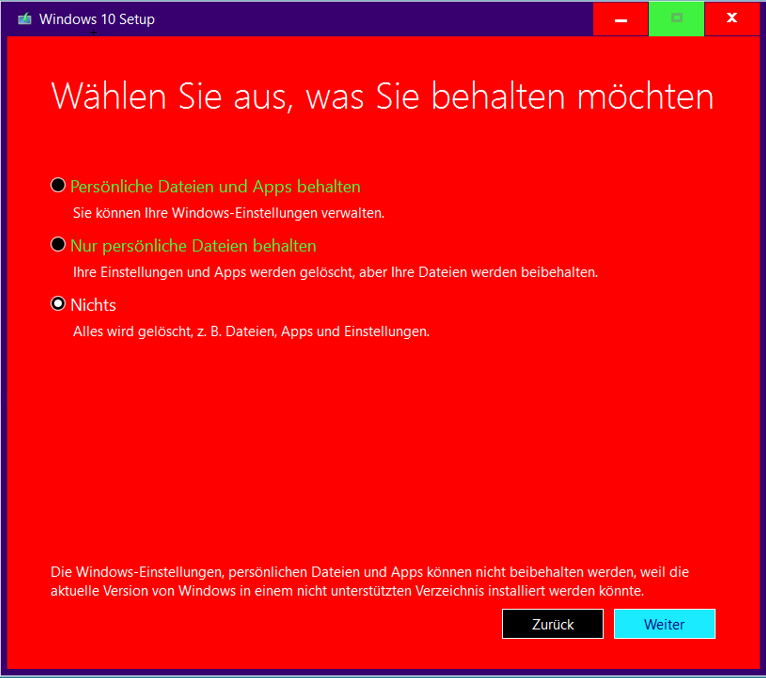 Gruß FUX |
|
22.12.2016, 09:55
| #13 |
| /// Winkelfunktion /// TB-Süch-Tiger™ | Win10: Flugmodus lässt sich nicht ausschalten - kein Internet - keine Netzwerkadapter [gelöst] Es wurde doch gsagt, dass dabei nichts verloren geht. Natürlich nur wenn du die erste Option anhakst. Und es wurde auch drauf hingewiesen, dass man trotzdem immer ein aktuelles Backup haben muss. Am besten alles wichtige auf einer externen Platte, die nach Gebrauch sicher in einem Schrank verwahrt wird.
__________________ Logfiles bitte immer in CODE-Tags posten |
|
22.12.2016, 09:58
| #14 |
| | Win10: Flugmodus lässt sich nicht ausschalten - kein Internet - keine Netzwerkadapter [gelöst] Sorry, aber das ist ja das Problem - siehe letzter Satz im Fenster! Die beiden anderen Optionen sind blockiert und nicht anwählbar! |
|
22.12.2016, 11:04
| #15 |
| /// Winkelfunktion /// TB-Süch-Tiger™ | Win10: Flugmodus lässt sich nicht ausschalten - kein Internet - keine Netzwerkadapter [gelöst] Bei diesen Augenkrebs-Farben hab ich das glatt überlesen  Ja, dann bleibt dir halt nix anderes übrig als alle Daten zu sichern. Und dann ne saubere Neuinstallation zu machen.
__________________ Logfiles bitte immer in CODE-Tags posten |
|
| Themen zu Win10: Flugmodus lässt sich nicht ausschalten - kein Internet - keine Netzwerkadapter |
| adapter, bat, beim starten, client, forum, funktioniert, funktioniert nicht, gen, hallo zusammen, infektion, internet, internetverbindung, kein internet, laptop, meldung, microsoft, netzwerkadapter, nicht mehr, ratlos, security, starten, verbindung, viren, win, wlan |


 Win10: Flugmodus lässt sich nicht ausschalten - kein Internet - keine Netzwerkadapter


 Linear-Darstellung

