
| |
| |||||||
Plagegeister aller Art und deren Bekämpfung: Seltsame Anwendung wollte bei Thunderbird-Setup AdministratorrechteWindows 7 Wenn Du nicht sicher bist, ob Du dir Malware oder Trojaner eingefangen hast, erstelle hier ein Thema. Ein Experte wird sich mit weiteren Anweisungen melden und Dir helfen die Malware zu entfernen oder Unerwünschte Software zu deinstallieren bzw. zu löschen. Bitte schildere dein Problem so genau wie möglich. Sollte es ein Trojaner oder Viren Problem sein wird ein Experte Dir bei der Beseitigug der Infektion helfen. |
 |
| |
 27.04.2015, 15:43
| #1 |
 |  Seltsame Anwendung wollte bei Thunderbird-Setup Administratorrechte Servus Trojanerboard, ich befürchte es hat mich erwischt. Ich bin normalerweise sehr vorsichtig und lade nur Software auf vertrauenswürdigen Quellen wie Heise Software oder den Herstellerseiten herunter. Heute wollte ich nach langer "Rechner-Abstinenz" (habe mit Laptop gearbeitet) aus einer Laune heraus von Mozilla die aktuelle Version von Thunderbird heruntergeladen. Als ich das Setup durch einen Doppelklick startete, wollte eine Anwendung mit dem Namen (in etwa) "Windows-Hausprozess (rundil)" Administratorrechte. Das Fenster war "vertrauenswürdig" blau, der Herausgeber war verifiziert (irgendwas mit Microsoft) und in diesem Moment war der Finger schneller als das Hirn. :-( Ich habe das Setup (das sich danach normal öffnete) aus Panik sofort beendet (aber nicht gelöscht). Zwar hat Microsoft Security Essentials bei dem vollständigen Suchlauf nichts gefunden, aber ich hatte trotzdem ein ungutes Gefühl. Deswegen habe ich einen Freund aus der IT telefonisch um Hilfe gebeten. Der hat mich zu euch geschickt, um zu prüfen ob das System wirklich sauber ist. Auf dem Rechner wurde Online-Banking betrieben, das letzte Mal vor zwei Tagen. Weil weder Microsoft Security Essentials noch MBAM (die anderen Logs sind etwas kryptisch) etwas gefunden hat, habe ich diesen Zugang noch nicht bei der Bank gesperrt. Ich habe so ein externes TAN-Generator-Ding, wo man die Karte reinsteckt und eine PIN eingibt. Das sollte doch in jedem Fall sicher sein, oder? Hier die vier Logs von defogger, FRST und GMER, ich habe auch noch (auf Rat des Kollegen) MBAM in dieser Reihenfolge ausgeführt. Ich hoffe das hat nicht geschadet. Defogger: Code:
ATTFilter defogger_disable by jpshortstuff (23.02.10.1)
Log created at 15:19 on 27/04/2015 (Thomas)
Checking for autostart values...
HKCU\~\Run values retrieved.
HKLM\~\Run values retrieved.
Checking for services/drivers...
-=E.O.F=-
FRST Logfile: FRST Logfile: FRST Logfile: Code:
ATTFilter Scan result of Farbar Recovery Scan Tool (FRST.txt) (x64) Version: 27-04-2015
Ran by Thomas (administrator) on THOMAS-PC on 27-04-2015 15:24:18
Running from C:\Users\Thomas\Downloads
Loaded Profiles: Thomas (Available profiles: Thomas)
Platform: Windows 7 Home Premium Service Pack 1 (X64) OS Language: Deutsch (Deutschland)
Internet Explorer Version 8 (Default browser: FF)
Boot Mode: Normal
Tutorial for Farbar Recovery Scan Tool: hxxp://www.geekstogo.com/forum/topic/335081-frst-tutorial-how-to-use-farbar-recovery-scan-tool/
==================== Processes (Whitelisted) =================
(If an entry is included in the fixlist, the process will be closed. The file will not be moved.)
(Microsoft Corporation) C:\Program Files\Microsoft Security Client\MsMpEng.exe
(Microsoft Corporation) C:\Program Files\Microsoft Security Client\NisSrv.exe
(Microsoft Corporation) C:\Program Files\Microsoft Security Client\msseces.exe
(Mozilla Corporation) C:\Program Files (x86)\Mozilla Firefox\firefox.exe
==================== Registry (Whitelisted) ==================
(If an entry is included in the fixlist, the registry item will be restored to default or removed. The file will not be moved.)
HKLM\...\Run: [MSC] => c:\Program Files\Microsoft Security Client\msseces.exe [1332296 2015-01-30] (Microsoft Corporation)
HKU\S-1-5-19\...\Run: [Sidebar] => %ProgramFiles%\Windows Sidebar\Sidebar.exe /autoRun
HKU\S-1-5-20\...\Run: [Sidebar] => %ProgramFiles%\Windows Sidebar\Sidebar.exe /autoRun
==================== Internet (Whitelisted) ====================
(If an item is included in the fixlist, if it is a registry item it will be removed or restored to default.)
HKLM\Software\Microsoft\Internet Explorer\Main,Search Page =
HKLM\Software\Wow6432Node\Microsoft\Internet Explorer\Main,Search Page =
HKLM\Software\Microsoft\Internet Explorer\Main,Default_Page_URL =
HKLM\Software\Wow6432Node\Microsoft\Internet Explorer\Main,Default_Page_URL =
HKLM\Software\Microsoft\Internet Explorer\Main,Default_Search_URL =
HKLM\Software\Wow6432Node\Microsoft\Internet Explorer\Main,Default_Search_URL =
HKLM\Software\Microsoft\Internet Explorer\Main,Local Page =
HKLM\Software\Wow6432Node\Microsoft\Internet Explorer\Main,Local Page =
Filter: deflate - {8f6b0360-b80d-11d0-a9b3-006097942311} - C:\Windows\system32\urlmon.dll [2010-11-21] (Microsoft Corporation)
Filter-x32: deflate - {8f6b0360-b80d-11d0-a9b3-006097942311} - C:\Windows\SysWOW64\urlmon.dll [2010-11-21] (Microsoft Corporation)
Filter: gzip - {8f6b0360-b80d-11d0-a9b3-006097942311} - C:\Windows\system32\urlmon.dll [2010-11-21] (Microsoft Corporation)
Filter-x32: gzip - {8f6b0360-b80d-11d0-a9b3-006097942311} - C:\Windows\SysWOW64\urlmon.dll [2010-11-21] (Microsoft Corporation)
Tcpip\Parameters: [DhcpNameServer] 8.8.8.8 83.169.184.161
FireFox:
========
FF ProfilePath: C:\Users\Thomas\AppData\Roaming\Mozilla\Firefox\Profiles\svd3mpjz.default
FF Plugin: @adobe.com/FlashPlayer -> C:\Windows\system32\Macromed\Flash\NPSWF64_17_0_0_169.dll [2015-04-27] ()
FF Plugin-x32: @adobe.com/FlashPlayer -> C:\Windows\SysWOW64\Macromed\Flash\NPSWF32_17_0_0_169.dll [2015-04-27] ()
FF Plugin-x32: Adobe Reader -> C:\Program Files (x86)\Adobe\Acrobat Reader DC\Reader\AIR\nppdf32.dll [2015-03-17] (Adobe Systems Inc.)
FF Extension: NoScript - C:\Users\Thomas\AppData\Roaming\Mozilla\Firefox\Profiles\svd3mpjz.default\Extensions\{73a6fe31-595d-460b-a920-fcc0f8843232}.xpi [2015-04-27]
FF Extension: Adblock Edge - C:\Users\Thomas\AppData\Roaming\Mozilla\Firefox\Profiles\svd3mpjz.default\Extensions\{fe272bd1-5f76-4ea4-8501-a05d35d823fc}.xpi [2015-04-27]
==================== Services (Whitelisted) =================
(If an entry is included in the fixlist, the service will be removed from the registry. The file will not be moved unless listed separately.)
R2 MsMpSvc; c:\Program Files\Microsoft Security Client\MsMpEng.exe [23784 2015-01-30] (Microsoft Corporation)
R3 NisSrv; c:\Program Files\Microsoft Security Client\NisSrv.exe [366512 2015-01-30] (Microsoft Corporation)
S3 WinDefend; C:\Program Files\Windows Defender\mpsvc.dll [1011712 2009-07-14] (Microsoft Corporation)
==================== Drivers (Whitelisted) ====================
(If an entry is included in the fixlist, the service will be removed from the registry. The file will not be moved unless listed separately.)
R0 MpFilter; C:\Windows\System32\DRIVERS\MpFilter.sys [274696 2014-11-15] (Microsoft Corporation)
R2 NisDrv; C:\Windows\System32\DRIVERS\NisDrvWFP.sys [124560 2014-11-15] (Microsoft Corporation)
==================== NetSvcs (Whitelisted) ===================
(If an item is included in the fixlist, it will be removed from the registry. Any associated file could be listed separately to be moved.)
==================== One Month Created Files and Folders ========
(If an entry is included in the fixlist, the file\folder will be moved.)
2015-04-27 15:23 - 2015-04-27 15:24 - 00004863 _____ () C:\Users\Thomas\Downloads\FRST.txt
2015-04-27 15:19 - 2015-04-27 15:24 - 00000000 ____D () C:\FRST
2015-04-27 15:19 - 2015-04-27 15:19 - 00000474 _____ () C:\Users\Thomas\Downloads\defogger_disable.log
2015-04-27 15:19 - 2015-04-27 15:19 - 00000000 _____ () C:\Users\Thomas\defogger_reenable
2015-04-27 15:18 - 2015-04-27 15:18 - 21546080 _____ (Malwarebytes Corporation ) C:\Users\Thomas\Downloads\mbam-setup-2.1.6.1022.exe
2015-04-27 15:18 - 2015-04-27 15:18 - 00602112 _____ (OldTimer Tools) C:\Users\Thomas\Downloads\OTL.exe
2015-04-27 15:17 - 2015-04-27 15:17 - 02100736 _____ (Farbar) C:\Users\Thomas\Downloads\FRST64.exe
2015-04-27 15:17 - 2015-04-27 15:17 - 00050477 _____ () C:\Users\Thomas\Downloads\Defogger.exe
2015-04-27 15:16 - 2015-04-27 15:16 - 00380416 _____ () C:\Users\Thomas\Downloads\yed4cxii.exe
2015-04-27 12:40 - 2015-04-27 12:40 - 28745120 _____ (Mozilla) C:\Users\Thomas\Downloads\Thunderbird Setup 31.6.0.exe
==================== One Month Modified Files and Folders =======
(If an entry is included in the fixlist, the file\folder will be moved.)
2015-04-27 15:12 - 2009-07-14 06:45 - 00022528 ____H () C:\Windows\system32\7B296FB0-376B-497e-B012-9C450E1B7327-5P-1.C7483456-A289-439d-8115-601632D005A0
2015-04-27 15:12 - 2009-07-14 06:45 - 00022528 ____H () C:\Windows\system32\7B296FB0-376B-497e-B012-9C450E1B7327-5P-0.C7483456-A289-439d-8115-601632D005A0
2015-04-27 15:09 - 2011-04-12 09:43 - 00643628 _____ () C:\Windows\system32\perfh007.dat
2015-04-27 15:09 - 2011-04-12 09:43 - 00126188 _____ () C:\Windows\system32\perfc007.dat
2015-04-27 15:09 - 2009-07-14 07:13 - 01472002 _____ () C:\Windows\system32\PerfStringBackup.INI
==================== Bamital & volsnap Check =================
(There is no automatic fix for files that do not pass verification.)
C:\Windows\System32\winlogon.exe => File is digitally signed
C:\Windows\System32\wininit.exe => File is digitally signed
C:\Windows\SysWOW64\wininit.exe => File is digitally signed
C:\Windows\explorer.exe => File is digitally signed
C:\Windows\SysWOW64\explorer.exe => File is digitally signed
C:\Windows\System32\svchost.exe => File is digitally signed
C:\Windows\SysWOW64\svchost.exe => File is digitally signed
C:\Windows\System32\services.exe => File is digitally signed
C:\Windows\System32\User32.dll => File is digitally signed
C:\Windows\SysWOW64\User32.dll => File is digitally signed
C:\Windows\System32\userinit.exe => File is digitally signed
C:\Windows\SysWOW64\userinit.exe => File is digitally signed
C:\Windows\System32\rpcss.dll => File is digitally signed
C:\Windows\System32\Drivers\volsnap.sys => File is digitally signed
LastRegBack: 2015-04-27 10:46
==================== End Of Log ============================
--- --- --- --- --- --- FRST Additional: Code:
ATTFilter Additional scan result of Farbar Recovery Scan Tool (x64) Version: 27-04-2015
Ran by Thomas at 2015-04-27 15:24:41
Running from C:\Users\Thomas\Downloads
Boot Mode: Normal
==========================================================
==================== Accounts: =============================
Administrator (S-1-5-21-2253816567-2930413787-4049114413-500 - Administrator - Disabled)
Gast (S-1-5-21-2253816567-2930413787-4049114413-501 - Limited - Disabled)
HomeGroupUser$ (S-1-5-21-2253816567-2930413787-4049114413-1002 - Limited - Enabled)
Thomas (S-1-5-21-2253816567-2930413787-4049114413-1000 - Administrator - Enabled) => C:\Users\Thomas
==================== Security Center ========================
(If an entry is included in the fixlist, it will be removed.)
AV: Microsoft Security Essentials (Enabled - Up to date) {B7ECF8CD-0188-6703-DBA4-AA65C6ACFB0A}
AS: Microsoft Security Essentials (Enabled - Up to date) {0C8D1929-27B2-688D-E114-9117BD2BB1B7}
AS: Windows Defender (Disabled - Up to date) {D68DDC3A-831F-4fae-9E44-DA132C1ACF46}
==================== Installed Programs ======================
(Only the adware programs with "hidden" flag could be added to the fixlist to unhide them. The adware programs should be uninstalled manually.)
Adobe Acrobat Reader DC - Deutsch (HKLM-x32\...\{AC76BA86-7AD7-1031-7B44-AC0F074E4100}) (Version: 15.007.20033 - Adobe Systems Incorporated)
Adobe Flash Player 17 NPAPI (HKLM-x32\...\Adobe Flash Player NPAPI) (Version: 17.0.0.169 - Adobe Systems Incorporated)
Microsoft Security Essentials (HKLM\...\Microsoft Security Client) (Version: 4.7.205.0 - Microsoft Corporation)
Mozilla Firefox 37.0.2 (x86 de) (HKLM-x32\...\Mozilla Firefox 37.0.2 (x86 de)) (Version: 37.0.2 - Mozilla)
Mozilla Maintenance Service (HKLM-x32\...\MozillaMaintenanceService) (Version: 37.0.2 - Mozilla)
WinRAR 5.21 (64-Bit) (HKLM\...\WinRAR archiver) (Version: 5.21.0 - win.rar GmbH)
==================== Custom CLSID (selected items): ==========================
(If an entry is included in the fixlist, it will be removed from registry. Any eventual file will not be moved.)
==================== Restore Points =========================
27-04-2015 12:06:55 Windows Update
==================== Hosts content: ==========================
(If needed Hosts: directive could be included in the fixlist to reset Hosts.)
2009-07-14 04:34 - 2009-06-10 23:00 - 00000824 ____A C:\Windows\system32\Drivers\etc\hosts
==================== Scheduled Tasks (whitelisted) =============
(If an entry is included in the fixlist, it will be removed from registry. Any associated file could be listed separately to be moved.)
Task: {0E2DACE6-91A8-407A-B987-1D8BA2DF6A10} - System32\Tasks\Adobe Acrobat Update Task => C:\Program Files (x86)\Common Files\Adobe\ARM\1.0\AdobeARM.exe [2015-03-07] (Adobe Systems Incorporated)
Task: {D6125483-61EA-4217-9C7D-5210D18FEA78} - System32\Tasks\Adobe Flash Player Updater => C:\Windows\SysWOW64\Macromed\Flash\FlashPlayerUpdateService.exe [2015-04-27] (Adobe Systems Incorporated)
Task: C:\Windows\Tasks\Adobe Flash Player Updater.job => C:\Windows\SysWOW64\Macromed\Flash\FlashPlayerUpdateService.exe
==================== Loaded Modules (whitelisted) ==============
2015-04-27 15:02 - 2015-04-27 15:02 - 00514711 _____ () C:\Windows\System32\sakuya64.dll
==================== Alternate Data Streams (whitelisted) =========
(If an entry is included in the fixlist, only the Alternate Data Streams will be removed.)
==================== Safe Mode (whitelisted) ===================
(If an item is included in the fixlist, it will be removed from the registry. The "AlternateShell" will be restored.)
==================== EXE Association (whitelisted) ===============
(If an entry is included in the fixlist, the default will be restored. None default entries will be removed.)
==================== Internet Explorer trusted/restricted ===============
(If an entry is included in the fixlist, the associated entry will be removed from the registry.)
==================== Other Areas ============================
(Currently there is no automatic fix for this section.)
HKU\S-1-5-21-2253816567-2930413787-4049114413-1000\Control Panel\Desktop\\Wallpaper -> C:\Users\Thomas\AppData\Roaming\Microsoft\Windows\Themes\TranscodedWallpaper.jpg
DNS Servers: 8.8.8.8 - 83.169.184.161
==================== MSCONFIG/TASK MANAGER disabled items ==
(Currently there is no automatic fix for this section.)
==================== FirewallRules (whitelisted) ===============
(If an entry is included in the fixlist, it will be removed from registry. Any eventual file will not be moved.)
FirewallRules: [{0AC118EF-43B9-400F-9FAC-16F00AE1BD50}] => (Allow) C:\Program Files (x86)\Mozilla Firefox\firefox.exe
FirewallRules: [{B83D6681-0807-43DF-AC3B-E3DC3DBC185B}] => (Allow) C:\Program Files (x86)\Mozilla Firefox\firefox.exe
==================== Faulty Device Manager Devices =============
Name: Basissystemgerät
Description: Basissystemgerät
Class Guid:
Manufacturer:
Service:
Problem: : The drivers for this device are not installed. (Code 28)
Resolution: To install the drivers for this device, click "Update Driver", which starts the Hardware Update wizard.
==================== Event log errors: =========================
Application errors:
==================
Error: (04/27/2015 03:24:43 PM) (Source: Application Error) (EventID: 1000) (User: )
Description: Name der fehlerhaften Anwendung: mod_frst.exe, Version: 3.3.12.0, Zeitstempel: 0x54dfeaf2
Name des fehlerhaften Moduls: unknown, Version: 0.0.0.0, Zeitstempel: 0x00000000
Ausnahmecode: 0xc0000005
Fehleroffset: 0x00080229
ID des fehlerhaften Prozesses: 0x9e4
Startzeit der fehlerhaften Anwendung: 0xmod_frst.exe0
Pfad der fehlerhaften Anwendung: mod_frst.exe1
Pfad des fehlerhaften Moduls: mod_frst.exe2
Berichtskennung: mod_frst.exe3
Error: (04/27/2015 03:10:14 PM) (Source: Application Error) (EventID: 1000) (User: )
Description: Name der fehlerhaften Anwendung: firefox.exe, Version: 37.0.2.5583, Zeitstempel: 0x552ee9ac
Name des fehlerhaften Moduls: unknown, Version: 0.0.0.0, Zeitstempel: 0x00000000
Ausnahmecode: 0xc0000005
Fehleroffset: 0x00080229
ID des fehlerhaften Prozesses: 0x7fc
Startzeit der fehlerhaften Anwendung: 0xfirefox.exe0
Pfad der fehlerhaften Anwendung: firefox.exe1
Pfad des fehlerhaften Moduls: firefox.exe2
Berichtskennung: firefox.exe3
Error: (04/27/2015 03:06:57 PM) (Source: WinMgmt) (EventID: 10) (User: )
Description: //./root/CIMV2SELECT * FROM __InstanceModificationEvent WITHIN 60 WHERE TargetInstance ISA "Win32_Processor" AND TargetInstance.LoadPercentage > 990x80041003
Error: (04/27/2015 02:57:27 PM) (Source: WinMgmt) (EventID: 10) (User: )
Description: //./root/CIMV2SELECT * FROM __InstanceModificationEvent WITHIN 60 WHERE TargetInstance ISA "Win32_Processor" AND TargetInstance.LoadPercentage > 990x80041003
Error: (04/27/2015 02:48:26 PM) (Source: WinMgmt) (EventID: 10) (User: )
Description: //./root/CIMV2SELECT * FROM __InstanceModificationEvent WITHIN 60 WHERE TargetInstance ISA "Win32_Processor" AND TargetInstance.LoadPercentage > 990x80041003
System errors:
=============
Error: (04/27/2015 00:12:30 PM) (Source: Service Control Manager) (EventID: 7006) (User: )
Description: Der Aufruf "ScRegSetValueExW" ist für "Start" aufgrund folgenden Fehlers fehlgeschlagen:
%%5
Microsoft Office Sessions:
=========================
Error: (04/27/2015 03:24:43 PM) (Source: Application Error) (EventID: 1000) (User: )
Description: mod_frst.exe3.3.12.054dfeaf2unknown0.0.0.000000000c0000005000802299e401d080ed85acc437C:\Windows\mod_frst.exeunknownc3784ea3-ece0-11e4-a794-08002710536d
Error: (04/27/2015 03:10:14 PM) (Source: Application Error) (EventID: 1000) (User: )
Description: firefox.exe37.0.2.5583552ee9acunknown0.0.0.000000000c0000005000802297fc01d080eb7e79afd7C:\Program Files (x86)\Mozilla Firefox\firefox.exeunknownbd7d8e51-ecde-11e4-a794-08002710536d
Error: (04/27/2015 03:06:57 PM) (Source: WinMgmt) (EventID: 10) (User: )
Description: //./root/CIMV2SELECT * FROM __InstanceModificationEvent WITHIN 60 WHERE TargetInstance ISA "Win32_Processor" AND TargetInstance.LoadPercentage > 990x80041003
Error: (04/27/2015 02:57:27 PM) (Source: WinMgmt) (EventID: 10) (User: )
Description: //./root/CIMV2SELECT * FROM __InstanceModificationEvent WITHIN 60 WHERE TargetInstance ISA "Win32_Processor" AND TargetInstance.LoadPercentage > 990x80041003
Error: (04/27/2015 02:48:26 PM) (Source: WinMgmt) (EventID: 10) (User: )
Description: //./root/CIMV2SELECT * FROM __InstanceModificationEvent WITHIN 60 WHERE TargetInstance ISA "Win32_Processor" AND TargetInstance.LoadPercentage > 990x80041003
==================== Memory info ===========================
Processor: Intel(R) Core(TM) i7 CPU 970 @ 3.20GHz
Percentage of memory in use: 29%
Total physical RAM: 4095.55 MB
Available physical RAM: 2892.63 MB
Total Pagefile: 8189.31 MB
Available Pagefile: 6994.12 MB
Total Virtual: 8192 MB
Available Virtual: 8191.84 MB
==================== Drives ================================
Drive c: () (Fixed) (Total:119.9 GB) (Free:102.61 GB) NTFS
Drive d: () (CDROM) (Total:0 GB) (Free:0 GB) UDF
==================== MBR & Partition Table ==================
========================================================
Disk: 0 (MBR Code: Windows 7 or 8) (Size: 120 GB) (Disk ID: 4D8E3977)
Partition 1: (Active) - (Size=100 MB) - (Type=07 NTFS)
Partition 2: (Not Active) - (Size=119.9 GB) - (Type=07 NTFS)
==================== End Of Log ============================
Code:
ATTFilter GMER 2.1.19357 - hxxp://www.gmer.net
Rootkit scan 2015-04-27 15:43:55
Windows 6.1.7601 Service Pack 1 x64 \Device\Harddisk0\DR0 -> \Device\Ide\IdeDeviceP2T0L0-4 WDC_WD10EZEX-00BN5AO rev.01.01A01 120,00GB
Running: yed4cxii.exe; Driver: C:\Users\Thomas\AppData\Local\Temp\uwdiipoc.sys
---- User code sections - GMER 2.1 ----
.text C:\Windows\explorer.exe[2452] C:\Windows\SYSTEM32\ntdll.dll!NtQuerySystemInformation 0000000076d41670 8 bytes JMP 0000000166d42bdf
.text C:\Windows\explorer.exe[2452] C:\Windows\system32\kernel32.dll!CreateProcessW 0000000076bf1bb0 5 bytes JMP 0000000166d42a22
---- Threads - GMER 2.1 ----
Thread C:\Windows\system32\slui.exe [2360:2632] 0000000000060210
---- EOF - GMER 2.1 ----
Code:
ATTFilter Malwarebytes Anti-Malware www.malwarebytes.org Suchlauf Datum: 27.04.2015 Suchlauf-Zeit: 15:51:36 Logdatei: MBAM.txt Administrator: Ja Version: 2.01.6.1022 Malware Datenbank: v2015.04.27.02 Rootkit Datenbank: v2015.04.21.01 Lizenz: Kostenlos Malware Schutz: Deaktiviert Bösartiger Webseiten Schutz: Deaktiviert Selbstschutz: Deaktiviert Betriebssystem: Windows 7 Service Pack 1 CPU: x64 Dateisystem: NTFS Benutzer: Thomas Suchlauf-Art: Bedrohungs-Suchlauf Ergebnis: Abgeschlossen Durchsuchte Objekte: 321054 Verstrichene Zeit: 4 Min, 45 Sek Speicher: Aktiviert Autostart: Aktiviert Dateisystem: Aktiviert Archive: Aktiviert Rootkits: Deaktiviert Heuristik: Aktiviert PUP: Aktiviert PUM: Aktiviert Prozesse: 0 (Keine schädliche Elemente gefunden) Module: 0 (Keine schädliche Elemente gefunden) Registrierungsschlüssel: 0 (Keine schädliche Elemente gefunden) Registrierungswerte: 0 (Keine schädliche Elemente gefunden) Registrierungsdaten: 0 (Keine schädliche Elemente gefunden) Ordner: 0 (Keine schädliche Elemente gefunden) Dateien: 0 (Keine schädliche Elemente gefunden) Physische Sektoren: 0 (Keine schädliche Elemente gefunden) (end) Viele, viele Grüße Thomas Geändert von ThoWag (27.04.2015 um 16:21 Uhr) Grund: Typo |
|
27.04.2015, 18:57
| #2 |
| /// the machine /// TB-Ausbilder    | Seltsame Anwendung wollte bei Thunderbird-Setup Administratorrechte hi,
__________________sieht eigentlich gut aus. Warst Du Admin als du den Installer gestartet hast?
__________________ |
|
27.04.2015, 19:23
| #3 |
| | Seltsame Anwendung wollte bei Thunderbird-Setup Administratorrechte Servus Schrauber,
__________________puh, das freut mich! :-) Ja, ich war als Admin angemeldet. Ich habe die Datei einfach aus dem Download-Ordner (halt nicht über den Firefox und auch nicht über "Als Administrator ausführen") mit Doppelklick gestartet. Ich habe jetzt testweise das Setup nochmal ausgeführt - wieder eine Abfrage, jetzt scheint aber alles normal zu sein. Thunderbird Setup als Programm und Mozilla als Herausgeber. :-) Viele Grüße! Thomas |
|
28.04.2015, 13:37
| #4 |
| | Seltsame Anwendung wollte bei Thunderbird-Setup Administratorrechte Servus Schrauber, ich befürchte, ich brauche doch noch deine Hilfe. Ist es normal, dass Windows bei "Herunterfahren erzwingen" mit einem Bluescreen abstürzt? Das ist jedes Mal reproduzierbar - öffne ich irgendetwas, was das Beenden von Windows behindert (Firefox, Editor) und drücke ich in den "Folgende Anwendungen müssen noch geschlossen werden"-Dialog den Knopf "Herunterfahren erzwingen" aus, stürzt Windows sofort ab. Ein schlampiges Handyfoto (der Rechner startet sich ja sofort wieder neu) im Anhang. Das ist der erste Bluescreen, den ich unter Windows 7 je hatte. Google spuckt zu dem Fehlercode "0x000000F4" u.A. Hardwareprobleme wie ein zu schwaches Netzteil aus. Aber warum sollte das Netzteil gerade in diesem Moment und nur dann (über)gefordert sein? :-( Ich habe keine Treiber installiert oder deinstalliert. Das Thunderbird-Setup habe ich auch nicht durchlaufen lassen, sondern bei der Anfrage der Adminrechte beendet ("Nein" gedrückt). Viele Grüße Thomas |
|
29.04.2015, 07:45
| #5 |
| /// the machine /// TB-Ausbilder | Seltsame Anwendung wollte bei Thunderbird-Setup Administratorrechte hi, bitte mal einen Bericht mit Bluescreenview erstellen: Windows Bluescreen Absturz analysieren und beheben - so geht's - Anleitungen
__________________ gruß, schrauber Proud Member of UNITE and ASAP since 2009 Spenden Anleitungen und Hilfestellungen Trojaner-Board Facebook-Seite Keine Hilfestellung via PM! |
|
29.04.2015, 08:13
| #6 |
| | Seltsame Anwendung wollte bei Thunderbird-Setup Administratorrechte Servus Schrauber, Code:
ATTFilter ==================================================
Dump File : 042815-20890-01.dmp
Crash Time : 28.04.2015 13:53:08
Bug Check String : CRITICAL_OBJECT_TERMINATION
Bug Check Code : 0x000000f4
Parameter 1 : 00000000`00000003
Parameter 2 : fffffa80`04195b30
Parameter 3 : fffffa80`04195e10
Parameter 4 : fffff800`029cc940
Caused By Driver : ntoskrnl.exe
Caused By Address : ntoskrnl.exe+72a40
File Description : NT Kernel & System
Product Name : Microsoft® Windows® Operating System
Company : Microsoft Corporation
File Version : 6.1.7601.18798 (win7sp1_gdr.150316-1654)
Processor : x64
Crash Address : ntoskrnl.exe+72a40
Stack Address 1 :
Stack Address 2 :
Stack Address 3 :
Computer Name :
Full Path : C:\Windows\Minidump\042815-20890-01.dmp
Processors Count : 4
Major Version : 15
Minor Version : 7601
Dump File Size : 268.832
Dump File Time : 28.04.2015 13:54:16
==================================================
==================================================
Dump File : 042815-15515-01.dmp
Crash Time : 28.04.2015 13:03:24
Bug Check String : CRITICAL_OBJECT_TERMINATION
Bug Check Code : 0x000000f4
Parameter 1 : 00000000`00000003
Parameter 2 : fffffa80`03cd2620
Parameter 3 : fffffa80`03cd2900
Parameter 4 : fffff800`02979940
Caused By Driver : ntoskrnl.exe
Caused By Address : ntoskrnl.exe+72a40
File Description : NT Kernel & System
Product Name : Microsoft® Windows® Operating System
Company : Microsoft Corporation
File Version : 6.1.7601.18798 (win7sp1_gdr.150316-1654)
Processor : x64
Crash Address : ntoskrnl.exe+72a40
Stack Address 1 :
Stack Address 2 :
Stack Address 3 :
Computer Name :
Full Path : C:\Windows\Minidump\042815-15515-01.dmp
Processors Count : 4
Major Version : 15
Minor Version : 7601
Dump File Size : 268.832
Dump File Time : 28.04.2015 13:04:04
==================================================
Thomas Geändert von ThoWag (29.04.2015 um 08:20 Uhr) |
|
30.04.2015, 06:52
| #7 |
| /// the machine /// TB-Ausbilder | Seltsame Anwendung wollte bei Thunderbird-Setup Administratorrechte
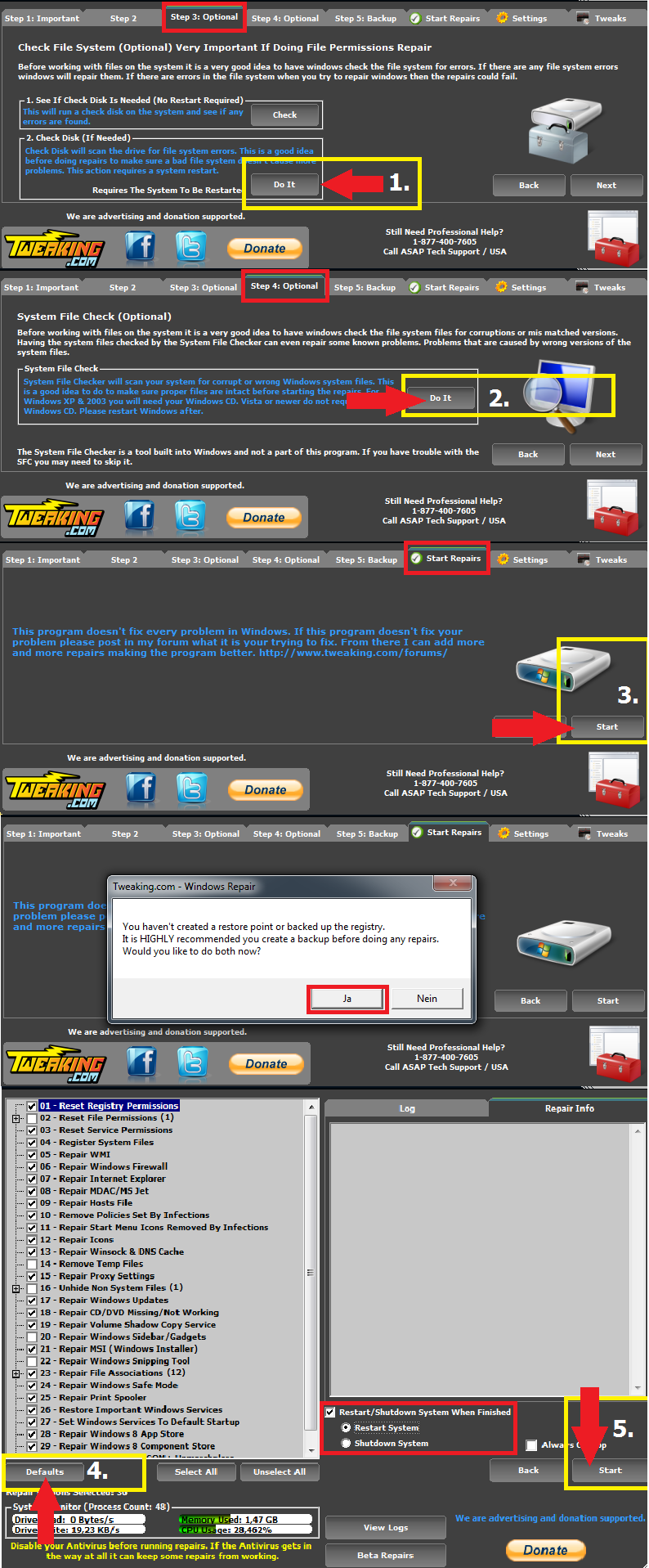
__________________ gruß, schrauber Proud Member of UNITE and ASAP since 2009 Spenden Anleitungen und Hilfestellungen Trojaner-Board Facebook-Seite Keine Hilfestellung via PM! |
|
30.04.2015, 12:08
| #8 | |
| | Seltsame Anwendung wollte bei Thunderbird-Setup Administratorrechte Servus Schrauber, das Programm hat viele Logdateien ("Repair_Windows_Firewall", "Repair_Windows_Update", etc.) angelegt, ich gehe davon aus du brauchst folgendes: Code:
ATTFilter Tweaking.com - Windows Repair v3.0.0
--------------------------------------------------------------------------------
System Variables
--------------------------------------------------------------------------------
OS: Windows 7 Home Premium
OS Architecture: 64-bit
OS Version: 6.1.7601
OS Service Pack: Service Pack 1
Computer Name: THOMAS-PC
Windows Drive: C:\
Windows Path: C:\Windows
Program Files: C:\Program Files
Program Files (x86): C:\Program Files (x86)
Current Profile: C:\Users\Thomas
Current Profile SID: S-1-5-21-2253816567-2930413787-4049114413-1000
Current Profile Classes: S-1-5-21-2253816567-2930413787-4049114413-1000_Classes
Profiles Location: C:\Users
Profiles Location 2: C:\Windows\ServiceProfiles
Local Settings AppData: C:\Users\Thomas\AppData\Local
--------------------------------------------------------------------------------
System Information
--------------------------------------------------------------------------------
System Up Time: 0 Days 00:08:47
Process Count: 43
Commit Total: 1,64 GB
Commit Limit: 8,00 GB
Commit Peak: 2,53 GB
Handle Count: 14311
Kernel Total: 201,69 MB
Kernel Paged: 164,50 MB
Kernel Non Paged: 37,19 MB
System Cache: 1,51 GB
Thread Count: 599
--------------------------------------------------------------------------------
Memory Before Cleaning with CleanMem
--------------------------------------------------------------------------------
Memory Total: 4,00 GB
Memory Used: 1,93 GB(48,3413%)
Memory Avail.: 2,07 GB
--------------------------------------------------------------------------------
Cleaning Memory Before Starting Repairs...
Memory After Cleaning with CleanMem
--------------------------------------------------------------------------------
Memory Total: 4,00 GB
Memory Used: 1,22 GB(30,5054%)
Memory Avail.: 2,78 GB
--------------------------------------------------------------------------------
Starting Repairs...
Started at (30.04.2015 11:10:21)
Setting Any Missing 'InstallDate' From Uninstall Sections Before Running Repair...
Total Missing 'InstallDate' Fixed: 28
01 - Reset Registry Permissions 01/03
HKEY_CURRENT_USER & Sub Keys
Start (30.04.2015 11:10:22)
Running Repair Under Current User Account
Done (30.04.2015 11:10:25)
01 - Reset Registry Permissions 02/03
HKEY_LOCAL_MACHINE & Sub Keys
Start (30.04.2015 11:10:25)
Decompressing & Updating Windows Permission File services.txt
Done, 0,14 seconds.
Running Repair Under System Account
Done (30.04.2015 11:14:12)
01 - Reset Registry Permissions 03/03
HKEY_CLASSES_ROOT & Sub Keys
Start (30.04.2015 11:14:12)
Running Repair Under System Account
Done (30.04.2015 11:15:20)
03 - Reset Service Permissions
Start (30.04.2015 11:15:20)
Running Repair Under Current User Account
Running Repair Under System Account
Done (30.04.2015 11:15:31)
04 - Register System Files
Start (30.04.2015 11:15:31)
Running Repair Under Current User Account
Running Repair Under System Account
Done (30.04.2015 11:15:56)
05 - Repair WMI
Start (30.04.2015 11:15:56)
Starting Security Center So We Can Export The Security Info.
Exporting Antivirus Info...
Microsoft Security Essentials Exported.
Exporting AntiSpyware Info...
Microsoft Security Essentials Exported.
Windows Defender Exported.
Exporting 3rd Party Firewall Info...
No Firewall Products Reported.
Running Repair Under Current User Account
Done (30.04.2015 11:17:41)
06 - Repair Windows Firewall
Start (30.04.2015 11:17:41)
Running Repair Under Current User Account
Decompressing & Updating Windows Permission File services.txt
Done, 0,14 seconds.
Running Repair Under System Account
Done (30.04.2015 11:18:09)
07 - Repair Internet Explorer
Start (30.04.2015 11:18:09)
Running Repair Under Current User Account
Running Repair Under System Account
Done (30.04.2015 11:18:27)
08 - Repair MDAC/MS Jet
Start (30.04.2015 11:18:27)
Running Repair Under Current User Account
Running Repair Under System Account
Done (30.04.2015 11:18:35)
09 - Repair Hosts File
Start (30.04.2015 11:18:35)
Running Repair Under System Account
Done (30.04.2015 11:18:36)
10 - Remove Policies Set By Infections
Start (30.04.2015 11:18:36)
Running Repair Under Current User Account
Running Repair Under System Account
Done (30.04.2015 11:18:41)
11 - Repair Start Menu Icons Removed By Infections
Start (30.04.2015 11:18:41)
Running Repair Under System Account
Done (30.04.2015 11:18:42)
12 - Repair Icons
Start (30.04.2015 11:18:42)
Running Repair Under Current User Account
Done (30.04.2015 11:18:43)
13 - Repair Winsock & DNS Cache
Start (30.04.2015 11:18:43)
Running Repair Under Current User Account
Running Repair Under System Account
Done (30.04.2015 11:18:59)
15 - Repair Proxy Settings
Start (30.04.2015 11:18:59)
Running Repair Under Current User Account
Running Repair Under System Account
Done (30.04.2015 11:19:01)
17 - Repair Windows Updates
Start (30.04.2015 11:19:01)
Running Repair Under Current User Account
Decompressing & Updating Windows Permission File services.txt
Done, 0,14 seconds.
Running Repair Under System Account
Setting Windows Updates Files That Are In Use To Be Removed At Next Boot.
Done (30.04.2015 11:20:21)
18 - Repair CD/DVD Missing/Not Working
Start (30.04.2015 11:20:21)
iTunes not found, not applying UpperFilters iTunes Reg Key
Done (30.04.2015 11:20:21)
19 - Repair Volume Shadow Copy Service
Start (30.04.2015 11:20:21)
Running Repair Under Current User Account
Decompressing & Updating Windows Permission File services.txt
Done, 0,14 seconds.
Running Repair Under System Account
Done (30.04.2015 11:20:41)
21 - Repair MSI (Windows Installer)
Start (30.04.2015 11:20:41)
Running Repair Under Current User Account
Decompressing & Updating Windows Permission File services.txt
Done, 0,14 seconds.
Running Repair Under System Account
Done (30.04.2015 11:20:51)
23.01 - Repair bat Association
Start (30.04.2015 11:20:52)
Running Repair Under Current User Account
Running Repair Under System Account
Done (30.04.2015 11:20:54)
23.02 - Repair cmd Association
Start (30.04.2015 11:20:54)
Running Repair Under Current User Account
Running Repair Under System Account
Done (30.04.2015 11:20:56)
23.03 - Repair com Association
Start (30.04.2015 11:20:56)
Running Repair Under Current User Account
Running Repair Under System Account
Done (30.04.2015 11:20:58)
23.04 - Repair Directory Association
Start (30.04.2015 11:20:58)
Running Repair Under Current User Account
Running Repair Under System Account
Done (30.04.2015 11:21:00)
23.05 - Repair Drive Association
Start (30.04.2015 11:21:00)
Running Repair Under Current User Account
Running Repair Under System Account
Done (30.04.2015 11:21:02)
23.06 - Repair exe Association
Start (30.04.2015 11:21:02)
Running Repair Under Current User Account
Running Repair Under System Account
Done (30.04.2015 11:21:04)
23.07 - Repair Folder Association
Start (30.04.2015 11:21:04)
Running Repair Under Current User Account
Running Repair Under System Account
Done (30.04.2015 11:21:06)
23.08 - Repair inf Association
Start (30.04.2015 11:21:06)
Running Repair Under Current User Account
Running Repair Under System Account
Done (30.04.2015 11:21:08)
23.09 - Repair lnk (Shortcuts) Association
Start (30.04.2015 11:21:09)
Running Repair Under Current User Account
Running Repair Under System Account
Done (30.04.2015 11:21:11)
23.10 - Repair msc Association
Start (30.04.2015 11:21:11)
Running Repair Under Current User Account
Running Repair Under System Account
Done (30.04.2015 11:21:13)
23.11 - Repair reg Association
Start (30.04.2015 11:21:13)
Running Repair Under Current User Account
Running Repair Under System Account
Done (30.04.2015 11:21:15)
23.12 - Repair scr Association
Start (30.04.2015 11:21:15)
Running Repair Under Current User Account
Running Repair Under System Account
Done (30.04.2015 11:21:17)
24 - Repair Windows Safe Mode
Start (30.04.2015 11:21:17)
Running Repair Under Current User Account
Running Repair Under System Account
Done (30.04.2015 11:21:19)
25 - Repair Print Spooler
Start (30.04.2015 11:21:19)
Running Repair Under Current User Account
Decompressing & Updating Windows Permission File services.txt
Done, 0,14 seconds.
Running Repair Under System Account
Done (30.04.2015 11:21:34)
26 - Restore Important Windows Services
Start (30.04.2015 11:21:34)
Running Repair Under Current User Account
Decompressing & Updating Windows Permission File services.txt
Done, 0,14 seconds.
Running Repair Under System Account
Done (30.04.2015 11:21:42)
27 - Set Windows Services To Default Startup
Start (30.04.2015 11:21:42)
Running Repair Under Current User Account
Running Repair Under System Account
Done (30.04.2015 11:21:50)
Skipping Repair.
Repair is for Windows v6.2 (Windows 8 & Newer) or higher.
Current version: 6.1
Skipping Repair.
Repair is for Windows v6.2 (Windows 8 & Newer) or higher.
Current version: 6.1
Skipping Repair.
Repair is for Windows v6.2 (Windows 8 & Newer) or higher.
Current version: 6.1
31 - Repair Windows 'New' Submenu
Start (30.04.2015 11:21:50)
Running Repair Under Current User Account
Running Repair Under System Account
Done (30.04.2015 11:21:52)
33 - Repair Performance Counters
Start (30.04.2015 11:21:52)
Running Repair Under Current User Account
Done (30.04.2015 11:21:55)
Cleaning up empty logs...
All Selected Repairs Done.
Done at (30.04.2015 11:21:55)
Total Repair Time: 00:11:36
...YOU MUST RESTART YOUR SYSTEM...
Code:
ATTFilter ==================================================
Dump File : 043015-11171-01.dmp
Crash Time : 30.04.2015 12:31:25
Bug Check String : CRITICAL_OBJECT_TERMINATION
Bug Check Code : 0x000000f4
Parameter 1 : 00000000`00000003
Parameter 2 : fffffa80`05200b30
Parameter 3 : fffffa80`05200e10
Parameter 4 : fffff800`01dc4940
Caused By Driver : ntoskrnl.exe
Caused By Address : ntoskrnl.exe+72a40
File Description : NT Kernel & System
Product Name : Microsoft® Windows® Operating System
Company : Microsoft Corporation
File Version : 6.1.7601.18798 (win7sp1_gdr.150316-1654)
Processor : x64
Crash Address : ntoskrnl.exe+72a40
Stack Address 1 :
Stack Address 2 :
Stack Address 3 :
Computer Name :
Full Path : C:\Windows\Minidump\043015-11171-01.dmp
Processors Count : 4
Major Version : 15
Minor Version : 7601
Dump File Size : 268.664
Dump File Time : 30.04.2015 12:32:21
==================================================
==================================================
Dump File : 043015-11468-01.dmp
Crash Time : 30.04.2015 12:29:33
Bug Check String : CRITICAL_OBJECT_TERMINATION
Bug Check Code : 0x000000f4
Parameter 1 : 00000000`00000003
Parameter 2 : fffffa80`072ff6a0
Parameter 3 : fffffa80`072ff980
Parameter 4 : fffff800`029c4940
Caused By Driver : ntoskrnl.exe
Caused By Address : ntoskrnl.exe+72a40
File Description : NT Kernel & System
Product Name : Microsoft® Windows® Operating System
Company : Microsoft Corporation
File Version : 6.1.7601.18798 (win7sp1_gdr.150316-1654)
Processor : x64
Crash Address : ntoskrnl.exe+72a40
Stack Address 1 :
Stack Address 2 :
Stack Address 3 :
Computer Name :
Full Path : C:\Windows\Minidump\043015-11468-01.dmp
Processors Count : 4
Major Version : 15
Minor Version : 7601
Dump File Size : 268.832
Dump File Time : 30.04.2015 12:30:19
==================================================
Zitat:
Viele Grüße und Danke Thomas :-) |
|
01.05.2015, 06:17
| #9 |
| /// the machine /// TB-Ausbilder | Seltsame Anwendung wollte bei Thunderbird-Setup Administratorrechte Ja, das ist die Ursache. Deswegen das Repair Tool. Du hast im Zuge des Repair Tool zu Beginn (Step 2 oder so) die Systemdateien gecheckt. Wurde dabei ein Fehler gefunden?
__________________ gruß, schrauber Proud Member of UNITE and ASAP since 2009 Spenden Anleitungen und Hilfestellungen Trojaner-Board Facebook-Seite Keine Hilfestellung via PM! |
|
01.05.2015, 11:21
| #10 |
| | Seltsame Anwendung wollte bei Thunderbird-Setup Administratorrechte Servus Schrauber, nein, ich glaube er hat nichts gefunden. Die Rückmeldung war irgendetwas mit "keine Integritätsverletzung". Viele Grüße Thomas |
|
02.05.2015, 07:53
| #11 |
| /// the machine /// TB-Ausbilder | Seltsame Anwendung wollte bei Thunderbird-Setup Administratorrechte Bitte mal die Festplatte prüfen: Zustand der Festplatte herausfinden - so gehts - Anleitungen
__________________ gruß, schrauber Proud Member of UNITE and ASAP since 2009 Spenden Anleitungen und Hilfestellungen Trojaner-Board Facebook-Seite Keine Hilfestellung via PM! |
|
02.05.2015, 20:32
| #12 |
| | Seltsame Anwendung wollte bei Thunderbird-Setup Administratorrechte Servus Schrauber, Code:
ATTFilter ----------------------------------------------------------------------------
CrystalDiskInfo 6.3.2 (C) 2008-2015 hiyohiyo
Crystal Dew World : hxxp://crystalmark.info/
----------------------------------------------------------------------------
OS : Windows 7 Home Premium SP1 [6.1 Build 7601] (x64)
Date : 2015/05/02 21:12:03
-- Controller Map ----------------------------------------------------------
+ ATA Channel 0 (0)
- WDC WD2500AAKX-001CA0 ATA Device
+ ATA Channel 1 (1)
- TSSTcorp DVD+-RW TS-H653H ATA Device
-- Disk List ---------------------------------------------------------------
(1) WDC WD2500AAKX-001CA0 : 128,8 GB [0/2/0, pd1]
----------------------------------------------------------------------------
(1) WDC WD2500AAKX-001CA0
----------------------------------------------------------------------------
Model : WDC WD2500AAKX-001CA0
Firmware : 15.01H15
Serial Number : VBe0c1f6bb-9e17c6ea
Disk Size : 128,8 GB (8,4/128,8/128,8/128,8)
Buffer Size : 16384 KB
Queue Depth : 32
# of Sectors : 251658240
Rotation Rate : Unbekannt
Interface : Serial ATA
Major Version : ATA8-ACS
Minor Version : ----
Transfer Mode : SATA/300 | SATA/600
Power On Hours : 12291 Std.
Power On Count : 1592 mal
Temperature : 41 C (105 F)
Health Status : Gut
Features : S.M.A.R.T., 48bit LBA, NCQ
APM Level : ----
AAM Level : ----
-- S.M.A.R.T. --------------------------------------------------------------
ID Cur Wor Thr RawValues(6) Attribute Name
01 200 200 _51 000000000000 Lesefehlerrate
03 140 138 _21 000000000F7E Mittl. Anlaufzeit
04 _93 _93 __0 000000001CFD Start/Stopp-Zyklen d. Spindel
05 200 200 140 000000000000 Anz. wiederzugewiesener Sektoren
07 200 200 __0 000000000000 Anz. Suchfehler
09 _84 _84 __0 000000003003 Betriebsstunden
0A 100 100 __0 000000000000 Anz. misslungener Spindelanläufe
0B 100 100 __0 000000000000 Anz. notwendiger Rekalibrierungen
0C _99 _99 __0 000000000638 Anz. Geräte-Einschaltvorgänge
C0 200 200 __0 000000000077 Ausschaltungsabbrüche
C1 198 198 __0 000000001C85 Laden/Entladen-Zyklen
C2 102 _92 __0 000000000029 Temperatur
C4 200 200 __0 000000000000 Wiederzuweisungsereignisse
C5 200 200 __0 000000000000 Aktuell schwebende Sektoren
C6 200 200 __0 000000000000 Nicht korrigierbare Sektoren
C7 200 200 __0 000000000000 UltraDMA-CRC-Fehler
C8 200 200 __0 000000000000 Schreibfehlerrate
-- IDENTIFY_DEVICE ---------------------------------------------------------
0 1 2 3 4 5 6 7 8 9
000: 427A 3FFF C837 0010 0000 0000 003F 0000 0000 0000
010: 2020 2020 2057 442D 5743 4159 5731 3734 3136 3839
020: 0000 8000 0032 3135 2E30 3148 3135 5744 4320 5744
030: 3235 3030 4141 4B58 2D30 3031 4341 3020 2020 2020
040: 2020 2020 2020 2020 2020 2020 2020 8010 0000 2F00
050: 4001 0000 0000 0007 3FFF 0010 003F FC10 00FB 0100
060: FFFF 0FFF 0000 0107 0003 0078 0078 0078 0078 0000
070: 0000 0000 0000 0000 0000 001F 170E 0004 0044 0040
080: 01FE 0000 746B 7D61 4123 7469 BC41 4123 007F 0014
090: 0014 0000 FFFE 0000 0000 0000 0000 0000 0000 0000
100: 5970 1D1C 0000 0000 0000 0000 0000 0000 5001 4EE2
110: B128 96D4 0000 0000 0000 0000 0000 0000 0000 4018
120: 4018 0000 0000 0000 0000 0000 0000 0000 0029 0000
130: 0000 0000 0000 16FE 0125 0000 0000 0000 0000 0000
140: 0000 0000 0004 0000 0000 0000 0000 0000 0000 0000
150: 0000 0000 0000 0000 0000 0000 0000 0000 0000 0000
160: 0000 0000 0000 0000 0000 0000 0000 0000 0000 0000
170: 0000 0000 0000 0000 0000 0000 0000 0000 0000 0000
180: 0000 0000 0000 0000 0000 0000 0000 0000 0000 0000
190: 0000 0000 0000 0000 0000 0000 0000 0000 0000 0000
200: 0000 0000 0000 0000 0000 0000 3037 0000 0000 0000
210: 0000 0000 0000 0000 0000 0000 0000 0000 0000 0000
220: 0000 0000 103E 0000 0000 0000 0000 0000 0000 0000
230: 0000 0000 0000 0000 0001 1000 0000 0000 0000 0000
240: 0000 0000 0000 0000 0000 0000 0000 0000 0000 0000
250: 0000 0000 0000 0000 0000 FCA5
-- SMART_READ_DATA ---------------------------------------------------------
+0 +1 +2 +3 +4 +5 +6 +7 +8 +9 +A +B +C +D +E +F
000: 10 00 01 2F 00 C8 C8 00 00 00 00 00 00 00 03 27
010: 00 8C 8A 7E 0F 00 00 00 00 00 04 32 00 5D 5D FD
020: 1C 00 00 00 00 00 05 33 00 C8 C8 00 00 00 00 00
030: 00 00 07 2E 00 C8 C8 00 00 00 00 00 00 00 09 32
040: 00 54 54 03 30 00 00 00 00 00 0A 32 00 64 64 00
050: 00 00 00 00 00 00 0B 32 00 64 64 00 00 00 00 00
060: 00 00 0C 32 00 63 63 38 06 00 00 00 00 00 C0 32
070: 00 C8 C8 77 00 00 00 00 00 00 C1 32 00 C6 C6 85
080: 1C 00 00 00 00 00 C2 22 00 66 5C 29 00 00 00 00
090: 00 00 C4 32 00 C8 C8 00 00 00 00 00 00 00 C5 32
0A0: 00 C8 C8 00 00 00 00 00 00 00 C6 30 00 C8 C8 00
0B0: 00 00 00 00 00 00 C7 32 00 C8 C8 00 00 00 00 00
0C0: 00 00 C8 08 00 C8 C8 00 00 00 00 00 00 00 00 00
0D0: 00 00 00 00 00 00 00 00 00 00 00 00 00 00 00 00
0E0: 00 00 00 00 00 00 00 00 00 00 00 00 00 00 00 00
0F0: 00 00 00 00 00 00 00 00 00 00 00 00 00 00 00 00
100: 00 00 00 00 00 00 00 00 00 00 00 00 00 00 00 00
110: 00 00 00 00 00 00 00 00 00 00 00 00 00 00 00 00
120: 00 00 00 00 00 00 00 00 00 00 00 00 00 00 00 00
130: 00 00 00 00 00 00 00 00 00 00 00 00 00 00 00 00
140: 00 00 00 00 00 00 00 00 00 00 00 00 00 00 00 00
150: 00 00 00 00 00 00 00 00 00 00 00 00 00 00 00 00
160: 00 00 00 00 00 00 00 00 00 00 82 00 F0 0F 01 7B
170: 03 00 01 00 02 2C 05 00 00 00 00 00 00 00 00 00
180: 00 00 01 01 00 00 00 00 00 00 00 00 00 00 00 00
190: 00 00 00 00 00 00 00 00 00 00 00 00 00 00 00 00
1A0: 00 00 00 00 00 00 00 00 00 00 00 00 00 00 00 00
1B0: 00 00 00 00 00 00 00 00 00 00 00 00 00 00 00 00
1C0: 00 00 00 00 00 00 00 00 00 00 00 00 00 00 00 00
1D0: 00 00 00 00 00 00 00 00 00 00 00 00 00 00 00 00
1E0: 00 00 00 00 00 00 00 00 00 00 00 00 00 00 00 00
1F0: 00 00 00 00 00 00 00 00 00 00 00 00 00 00 00 D2
-- SMART_READ_THRESHOLD ----------------------------------------------------
+0 +1 +2 +3 +4 +5 +6 +7 +8 +9 +A +B +C +D +E +F
000: 10 00 01 33 C8 00 00 00 00 00 00 00 00 00 03 15
010: 00 00 00 00 00 00 00 00 00 00 04 00 00 00 00 00
020: 00 00 00 00 00 00 05 8C 00 00 00 00 00 00 00 00
030: 00 00 07 00 C8 00 00 00 00 00 00 00 00 00 09 00
040: 00 00 00 00 00 00 00 00 00 00 0A 00 00 00 00 00
050: 00 00 00 00 00 00 0B 00 00 00 00 00 00 00 00 00
060: 00 00 0C 00 00 00 00 00 00 00 00 00 00 00 C0 00
070: 00 00 00 00 00 00 00 00 00 00 C1 00 00 00 00 00
080: 00 00 00 00 00 00 C2 00 00 00 00 00 00 00 00 00
090: 00 00 C4 00 00 00 00 00 00 00 00 00 00 00 C5 00
0A0: 00 00 00 00 00 00 00 00 00 00 C6 00 00 00 00 00
0B0: 00 00 00 00 00 00 C7 00 00 00 00 00 00 00 00 00
0C0: 00 00 C8 00 C8 00 00 00 00 00 00 00 00 00 00 00
0D0: 00 00 00 00 00 00 00 00 00 00 00 00 00 00 00 00
0E0: 00 00 00 00 00 00 00 00 00 00 00 00 00 00 00 00
0F0: 00 00 00 00 00 00 00 00 00 00 00 00 00 00 00 00
100: 00 00 00 00 00 00 00 00 00 00 00 00 00 00 00 00
110: 00 00 00 00 00 00 00 00 00 00 00 00 00 00 00 00
120: 00 00 00 00 00 00 00 00 00 00 00 00 00 00 00 00
130: 00 00 00 00 00 00 00 00 00 00 00 00 00 00 00 00
140: 00 00 00 00 00 00 00 00 00 00 00 00 00 00 00 00
150: 00 00 00 00 00 00 00 00 00 00 00 00 00 00 00 00
160: 00 00 00 00 00 00 00 00 00 00 00 00 00 00 00 00
170: 00 00 00 00 00 00 00 00 00 00 00 00 00 00 00 00
180: 00 00 00 00 00 00 00 00 00 00 00 00 00 00 00 00
190: 00 00 00 00 00 00 00 00 00 00 00 00 00 00 00 00
1A0: 00 00 00 00 00 00 00 00 00 00 00 00 00 00 00 00
1B0: 00 00 00 00 00 00 00 00 00 00 00 00 00 00 00 00
1C0: 00 00 00 00 00 00 00 00 00 00 00 00 00 00 00 00
1D0: 00 00 00 00 00 00 00 00 00 00 00 00 00 00 00 00
1E0: 00 00 00 00 00 00 00 00 00 00 00 00 00 00 00 00
1F0: 00 00 00 00 00 00 00 00 00 00 00 00 00 00 00 65
Viele Grüße Thomas Geändert von ThoWag (02.05.2015 um 21:10 Uhr) Grund: Typo |
|
03.05.2015, 13:48
| #13 |
| /// the machine /// TB-Ausbilder | Seltsame Anwendung wollte bei Thunderbird-Setup Administratorrechte Es kann natürlich immer noch was in Windows selbst sein. Windows DVD zur Hand damit wir ein Inplace Upgrade versuchen können?
__________________ gruß, schrauber Proud Member of UNITE and ASAP since 2009 Spenden Anleitungen und Hilfestellungen Trojaner-Board Facebook-Seite Keine Hilfestellung via PM! |
|
03.05.2015, 14:51
| #14 |
| | Seltsame Anwendung wollte bei Thunderbird-Setup Administratorrechte Servus Schrauber, du meinst die Windows 7 Installations-DVD? Ja, habe ich noch da. :-) Viele Grüße Thomas |
|
04.05.2015, 11:23
| #15 |
| /// the machine /// TB-Ausbilder | Seltsame Anwendung wollte bei Thunderbird-Setup Administratorrechte
__________________ gruß, schrauber Proud Member of UNITE and ASAP since 2009 Spenden Anleitungen und Hilfestellungen Trojaner-Board Facebook-Seite Keine Hilfestellung via PM! |
|
| Themen zu Seltsame Anwendung wollte bei Thunderbird-Setup Administratorrechte |
| .dll, administratorrechte, adware, browser, cpu, defender, desktop, explorer, firefox, flash player, harddisk, home, karte, microsoft, mozilla, prüfen, registry, scan, schutz, security, services.exe, software, svchost.exe, system, winlogon.exe |


 Hybrid-Darstellung
