
| |
| |||||||
Log-Analyse und Auswertung: "Schlachtmusik"-Problem unter Vista 32-BitWindows 7 Wenn Du Dir einen Trojaner eingefangen hast oder ständig Viren Warnungen bekommst, kannst Du hier die Logs unserer Diagnose Tools zwecks Auswertung durch unsere Experten posten. Um Viren und Trojaner entfernen zu können, muss das infizierte System zuerst untersucht werden: Erste Schritte zur Hilfe. Beachte dass ein infiziertes System nicht vertrauenswürdig ist und bis zur vollständigen Entfernung der Malware nicht verwendet werden sollte.XML. |
 |
| |
 29.07.2010, 15:49
| #1 |
 |  "Schlachtmusik"-Problem unter Vista 32-Bit Okay.. Heute ist wohl einfach nicht mein Tag. Dann halt per File-Upload: hxxp://www.file-upload.net/download-2707816/mbr.dat.html Okay... Und was genau mache ich nun mit dem Bootkit Remover? Geändert von Sabishii (29.07.2010 um 15:54 Uhr) |
|
29.07.2010, 15:58
| #2 |
| /// Selecta Jahrusso   | "Schlachtmusik"-Problem unter Vista 32-Bit__________________
__________________ |
|
29.07.2010, 16:03
| #3 |
| | "Schlachtmusik"-Problem unter Vista 32-Bit Ok, gemacht (und diesmal auch als Admin ausgeführt. xD):
__________________Code:
ATTFilter Bootkit Remover
(c) 2009 eSage Lab
www.esagelab.com

Program version: 1.1.0.0
OS Version: Microsoft Windows Vista Home Premium Edition Service Pack 2 (build 6
002), 32-bit

System volume is \\.\C:
\\.\C: -> \\.\PhysicalDrive0 at offset 0x00000000`00100000
Boot sector MD5 is: 1af81ee9fd1ba67cd6c7ee2405635334

     Size  Device Name          MBR Status
 --------------------------------------------
   596 GB  \\.\PhysicalDrive0   Unknown boot code

Unknown boot code has been found on some of your physical disks.
To inspect the boot code manually, dump the master boot sector:
remover.exe dump <device_name> [output_file]
To disinfect the master boot sector, use the following command:
remover.exe fix <device_name>


Done;
Press any key to quit...
|
|
29.07.2010, 16:06
| #4 |
| /// Selecta Jahrusso | "Schlachtmusik"-Problem unter Vista 32-Bit Verschiede die remover.exe bitte nach C:\windows Windows + R Taste drücken Kopiere nun folgendes in die Kommandozeile remover.exe fix \\.\PhysicalDrive0 klicke OK Starte den Rechner neu auf und poste mir erneut eine BootkitRemover Logfile Windows CD vorhanden ?
__________________ mfg, Daniel ASAP & UNITE Member Alliance of Security Analysis Professionals Unified Network of Instructors and Trusted Eliminators Lerne, zurück zu schlagen und unterstütze uns! TB Akademie |
|
29.07.2010, 16:22
| #5 |
| | "Schlachtmusik"-Problem unter Vista 32-Bit Also.. Irgendwas scheint da nicht funktionieren zu wollen. Nachdem ich das in die Befehlszeile kopiert und ausgeführt habe, kam das: Code:
ATTFilter Bootkit Remover
(c) 2009 eSage Lab
www.esagelab.com
Program version: 1.1.0.0
OS Version: Microsoft Windows Vista Home Premium Edition Service Pack 2 (build 6
002), 32-bit
Restoring boot code at \\.\PhysicalDrive0...
ERROR: No standard boot code found for your OS.
You can restore boot code only for Windows XP, Server 2003, Vista, Server 2008 a
nd Windows 7
Done;
Press any key to quit...
Den Neustart habe ich danach dennoch mal ausgeführt. Danach konnte ich plötzlich den Log vom Remover nicht mehr mit Strg+c kopieren. Nach ein paar Versuchen gings dann doch wieder... Hier der Log: Code:
ATTFilter (c) 2009 eSage Lab
www.esagelab.com
Program version: 1.1.0.0
OS Version: Microsoft Windows Vista Home Premium Edition Service Pack 2 (build 6
002), 32-bit
System volume is \\.\C:
\\.\C: -> \\.\PhysicalDrive0 at offset 0x00000000`00100000
Boot sector MD5 is: 1af81ee9fd1ba67cd6c7ee2405635334
Size Device Name MBR Status
--------------------------------------------
596 GB \\.\PhysicalDrive0 Unknown boot code
Unknown boot code has been found on some of your physical disks.
To inspect the boot code manually, dump the master boot sector:
remover.exe dump <device_name> [output_file]
To disinfect the master boot sector, use the following command:
remover.exe fix <device_name>
Done;
Press any key to quit...
Und ja, die CD liegt hier bereits griffbereit neben dem Rechner. :-) Habe hier eine Recovery Disc sowie eine "Application & Support-Disc". Ist ein Medion-Rechner, sollte ich vielleicht dazusagen. |
|
29.07.2010, 16:40
| #6 |
| /// Selecta Jahrusso | "Schlachtmusik"-Problem unter Vista 32-Bit Kannst du einmal folgendes versuchen ? Systemwiederherstellungskonsole installieren
Wenn eine Fehlermeldung kommt, sag bitte bescheid
__________________ --> "Schlachtmusik"-Problem unter Vista 32-Bit |
|
29.07.2010, 16:50
| #7 |
| | "Schlachtmusik"-Problem unter Vista 32-Bit Wenn ich das in das Ausführen-Feld kopiere und auf "Ok" klicke, bekomme ich bloß eine Fehlermeldung. Screen: 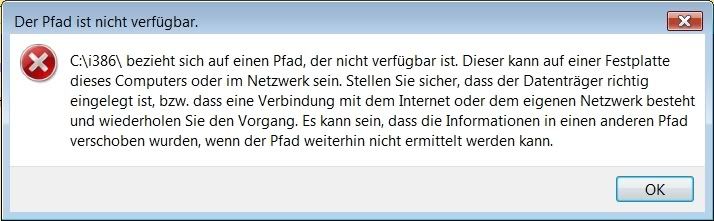 Als ich den PC gekauft habe, war Vista bereits vorinstalliert. Warum hab ich den leisen Verdacht, dass dabei Mist gebaut wurde...?  |
|
| Themen zu "Schlachtmusik"-Problem unter Vista 32-Bit |
| 32-bit, adobe, antivir, antivir guard, avg, avira, bho, defender, desktop, ebay, excel, explorer, firefox, hijackthis, internet, internet explorer, mozilla, musik, nvidia, plug-in, realtek, rundll, schlachtmusik, software, start menu, system, trojaner, trojaner eingefangen, vista, windows |


 Hybrid-Darstellung
