
| |
| |||||||
Log-Analyse und Auswertung: W32/Patched.UC' [virus] in 'C:\Windows\System32\services.exeWindows 7 Wenn Du Dir einen Trojaner eingefangen hast oder ständig Viren Warnungen bekommst, kannst Du hier die Logs unserer Diagnose Tools zwecks Auswertung durch unsere Experten posten. Um Viren und Trojaner entfernen zu können, muss das infizierte System zuerst untersucht werden: Erste Schritte zur Hilfe. Beachte dass ein infiziertes System nicht vertrauenswürdig ist und bis zur vollständigen Entfernung der Malware nicht verwendet werden sollte.XML. |
 |
 17.05.2013, 13:01
| #16 |
| /// Malwareteam / Visitor  | ![W32/Patched.UC' [virus] in 'C:\Windows\System32\services.exe - Standard](images/icons/icon1.gif) W32/Patched.UC' [virus] in 'C:\Windows\System32\services.exe Downloade Dir untenstehende Reg-Dateien: http://download.bleepingcomputer.com...s/7/MpsSvc.reg http://download.bleepingcomputer.com.../WinDefend.reg DoppelKlicken und Änderungen ermöglichen  Rechner neustarten und eine neue Farbar Service Scanner Log erstellen. |
|
17.05.2013, 13:08
| #17 |
 | W32/Patched.UC' [virus] in 'C:\Windows\System32\services.exe Soviele Neustarts hat der glaub ich das gesamte letzte Jahr insgesamt nicht bekommen
__________________ Code:
ATTFilter Farbar Service Scanner Version: 14-04-2013
Ran by Miyu (administrator) on 17-05-2013 at 14:05:53
Running from "C:\Users\Miyu\Desktop"
Windows 7 Professional Service Pack 1 (X64)
Boot Mode: Normal
****************************************************************
Internet Services:
============
Connection Status:
==============
Localhost is accessible.
LAN connected.
Google IP is accessible.
Google.com is accessible.
Attempt to access Yahoo IP returned error. Yahoo IP is offline
Yahoo.com is accessible.
Windows Firewall:
=============
MpsSvc Service is not running. Checking service configuration:
The start type of MpsSvc service is OK.
The ImagePath of MpsSvc service is OK.
The ServiceDll of MpsSvc service is OK.
Firewall Disabled Policy:
==================
System Restore:
============
System Restore Disabled Policy:
========================
Action Center:
============
wscsvc Service is not running. Checking service configuration:
Checking Start type: ATTENTION!=====> Unable to open wscsvc registry key. The service key does not exist.
Checking ImagePath: ATTENTION!=====> Unable to open wscsvc registry key. The service key does not exist.
Checking ServiceDll: ATTENTION!=====> Unable to open wscsvc registry key. The service key does not exist.
Windows Update:
============
wuauserv Service is not running. Checking service configuration:
Checking Start type: ATTENTION!=====> Unable to open wuauserv registry key. The service key does not exist.
Checking ImagePath: ATTENTION!=====> Unable to open wuauserv registry key. The service key does not exist.
Checking ServiceDll: ATTENTION!=====> Unable to open wuauserv registry key. The service key does not exist.
BITS Service is not running. Checking service configuration:
Checking Start type: ATTENTION!=====> Unable to open BITS registry key. The service key does not exist.
Checking ImagePath: ATTENTION!=====> Unable to open BITS registry key. The service key does not exist.
Checking ServiceDll: ATTENTION!=====> Unable to open BITS registry key. The service key does not exist.
Windows Autoupdate Disabled Policy:
============================
Windows Defender:
==============
WinDefend Service is not running. Checking service configuration:
The start type of WinDefend service is OK.
The ImagePath of WinDefend service is OK.
The ServiceDll of WinDefend service is OK.
Windows Defender Disabled Policy:
==========================
[HKEY_LOCAL_MACHINE\SOFTWARE\Microsoft\Windows Defender]
"DisableAntiSpyware"=DWORD:1
Other Services:
==============
Checking Start type of SharedAccess: ATTENTION!=====> Unable to retrieve start type of SharedAccess. The value does not exist.
Checking ImagePath of SharedAccess: ATTENTION!=====> Unable to retrieve ImagePath of SharedAccess. The value does not exist.
Checking ServiceDll of SharedAccess: ATTENTION!=====> Unable to retrieve ServiceDll of SharedAccess. The value does not exist.
Checking Start type of iphlpsvc: ATTENTION!=====> Unable to open iphlpsvc registry key. The service key does not exist.
Checking ImagePath of iphlpsvc: ATTENTION!=====> Unable to open iphlpsvc registry key. The service key does not exist.
Checking ServiceDll of iphlpsvc: ATTENTION!=====> Unable to open iphlpsvc registry key. The service key does not exist.
File Check:
========
C:\Windows\System32\nsisvc.dll => MD5 is legit
C:\Windows\System32\drivers\nsiproxy.sys => MD5 is legit
C:\Windows\System32\dhcpcore.dll => MD5 is legit
C:\Windows\System32\drivers\afd.sys => MD5 is legit
C:\Windows\System32\drivers\tdx.sys => MD5 is legit
C:\Windows\System32\Drivers\tcpip.sys => MD5 is legit
C:\Windows\System32\dnsrslvr.dll => MD5 is legit
C:\Windows\System32\mpssvc.dll => MD5 is legit
C:\Windows\System32\bfe.dll => MD5 is legit
C:\Windows\System32\drivers\mpsdrv.sys => MD5 is legit
C:\Windows\System32\SDRSVC.dll => MD5 is legit
C:\Windows\System32\vssvc.exe => MD5 is legit
C:\Windows\System32\wscsvc.dll => MD5 is legit
C:\Windows\System32\wbem\WMIsvc.dll => MD5 is legit
C:\Windows\System32\wuaueng.dll => MD5 is legit
C:\Windows\System32\qmgr.dll => MD5 is legit
C:\Windows\System32\es.dll => MD5 is legit
C:\Windows\System32\cryptsvc.dll => MD5 is legit
C:\Program Files\Windows Defender\MpSvc.dll
[2009-07-14 01:54] - [2009-07-14 03:41] - 1011712 ____A () D41D8CD98F00B204E9800998ECF8427E
ATTENTION!=====> C:\Program Files\Windows Defender\MpSvc.dll IS INFECTED AND SHOULD BE REPLACED.
C:\Windows\System32\ipnathlp.dll => MD5 is legit
C:\Windows\System32\iphlpsvc.dll => MD5 is legit
C:\Windows\System32\svchost.exe => MD5 is legit
C:\Windows\System32\rpcss.dll => MD5 is legit
**** End of log ****
|
|
17.05.2013, 13:37
| #18 |
| /// Malwareteam / Visitor | W32/Patched.UC' [virus] in 'C:\Windows\System32\services.exe Es kommen noch einige Neustarts dazu
__________________Downloade Dir untenstehende Reg-Dateien: http://download.bleepingcomputer.com...ces/7/BITS.reg http://download.bleepingcomputer.com...7/wuauserv.reg http://download.bleepingcomputer.com...s/7/wscsvc.reg DoppelKlicken und Änderungen ermöglichen Rechner neustarten und eine neue Farbar Service Scanner Log erstellen. |
|
17.05.2013, 13:44
| #19 |
| | W32/Patched.UC' [virus] in 'C:\Windows\System32\services.exe Code:
ATTFilter Farbar Service Scanner Version: 14-04-2013
Ran by Miyu (administrator) on 17-05-2013 at 14:43:18
Running from "C:\Users\Miyu\Desktop"
Windows 7 Professional Service Pack 1 (X64)
Boot Mode: Normal
****************************************************************
Internet Services:
============
Connection Status:
==============
Localhost is accessible.
LAN connected.
Google IP is accessible.
Google.com is accessible.
Attempt to access Yahoo IP returned error. Yahoo IP is offline
Yahoo.com is accessible.
Windows Firewall:
=============
MpsSvc Service is not running. Checking service configuration:
The start type of MpsSvc service is OK.
The ImagePath of MpsSvc service is OK.
The ServiceDll of MpsSvc service is OK.
Firewall Disabled Policy:
==================
System Restore:
============
System Restore Disabled Policy:
========================
Action Center:
============
wscsvc Service is not running. Checking service configuration:
The start type of wscsvc service is OK.
The ImagePath of wscsvc service is OK.
The ServiceDll of wscsvc service is OK.
Windows Update:
============
wuauserv Service is not running. Checking service configuration:
The start type of wuauserv service is OK.
The ImagePath of wuauserv service is OK.
The ServiceDll of wuauserv service is OK.
Windows Autoupdate Disabled Policy:
============================
Windows Defender:
==============
WinDefend Service is not running. Checking service configuration:
The start type of WinDefend service is OK.
The ImagePath of WinDefend service is OK.
The ServiceDll of WinDefend service is OK.
Windows Defender Disabled Policy:
==========================
[HKEY_LOCAL_MACHINE\SOFTWARE\Microsoft\Windows Defender]
"DisableAntiSpyware"=DWORD:1
Other Services:
==============
Checking Start type of SharedAccess: ATTENTION!=====> Unable to retrieve start type of SharedAccess. The value does not exist.
Checking ImagePath of SharedAccess: ATTENTION!=====> Unable to retrieve ImagePath of SharedAccess. The value does not exist.
Checking ServiceDll of SharedAccess: ATTENTION!=====> Unable to retrieve ServiceDll of SharedAccess. The value does not exist.
Checking Start type of iphlpsvc: ATTENTION!=====> Unable to open iphlpsvc registry key. The service key does not exist.
Checking ImagePath of iphlpsvc: ATTENTION!=====> Unable to open iphlpsvc registry key. The service key does not exist.
Checking ServiceDll of iphlpsvc: ATTENTION!=====> Unable to open iphlpsvc registry key. The service key does not exist.
File Check:
========
C:\Windows\System32\nsisvc.dll => MD5 is legit
C:\Windows\System32\drivers\nsiproxy.sys => MD5 is legit
C:\Windows\System32\dhcpcore.dll => MD5 is legit
C:\Windows\System32\drivers\afd.sys => MD5 is legit
C:\Windows\System32\drivers\tdx.sys => MD5 is legit
C:\Windows\System32\Drivers\tcpip.sys => MD5 is legit
C:\Windows\System32\dnsrslvr.dll => MD5 is legit
C:\Windows\System32\mpssvc.dll => MD5 is legit
C:\Windows\System32\bfe.dll => MD5 is legit
C:\Windows\System32\drivers\mpsdrv.sys => MD5 is legit
C:\Windows\System32\SDRSVC.dll => MD5 is legit
C:\Windows\System32\vssvc.exe => MD5 is legit
C:\Windows\System32\wscsvc.dll => MD5 is legit
C:\Windows\System32\wbem\WMIsvc.dll => MD5 is legit
C:\Windows\System32\wuaueng.dll => MD5 is legit
C:\Windows\System32\qmgr.dll => MD5 is legit
C:\Windows\System32\es.dll => MD5 is legit
C:\Windows\System32\cryptsvc.dll => MD5 is legit
C:\Program Files\Windows Defender\MpSvc.dll
[2009-07-14 01:54] - [2009-07-14 03:41] - 1011712 ____A () D41D8CD98F00B204E9800998ECF8427E
ATTENTION!=====> C:\Program Files\Windows Defender\MpSvc.dll IS INFECTED AND SHOULD BE REPLACED.
C:\Windows\System32\ipnathlp.dll => MD5 is legit
C:\Windows\System32\iphlpsvc.dll => MD5 is legit
C:\Windows\System32\svchost.exe => MD5 is legit
C:\Windows\System32\rpcss.dll => MD5 is legit
**** End of log ****
|
|
17.05.2013, 14:32
| #20 |
| /// Malwareteam / Visitor | W32/Patched.UC' [virus] in 'C:\Windows\System32\services.exe Es sieht schon besser aus, aber irgendwie läuft es noch nicht ganz gut. Versuch mal diese Microsoft Fix: Automatische Diagnose und Behebung von Problemen mit der Windows-Firewall Nachher eine neue FSS Log-Datei erstellen. |
|
17.05.2013, 14:59
| #21 |
| | W32/Patched.UC' [virus] in 'C:\Windows\System32\services.exeCode:
ATTFilter Farbar Service Scanner Version: 14-04-2013
Ran by Miyu (administrator) on 17-05-2013 at 15:56:41
Running from "C:\Users\Miyu\Desktop"
Windows 7 Professional Service Pack 1 (X64)
Boot Mode: Normal
****************************************************************
Internet Services:
============
Connection Status:
==============
Localhost is accessible.
LAN connected.
Google IP is accessible.
Google.com is accessible.
Attempt to access Yahoo IP returned error. Yahoo IP is offline
Yahoo.com is accessible.
Windows Firewall:
=============
MpsSvc Service is not running. Checking service configuration:
The start type of MpsSvc service is OK.
The ImagePath of MpsSvc service is OK.
The ServiceDll of MpsSvc service is OK.
Firewall Disabled Policy:
==================
System Restore:
============
System Restore Disabled Policy:
========================
Action Center:
============
Windows Update:
============
Windows Autoupdate Disabled Policy:
============================
Windows Defender:
==============
WinDefend Service is not running. Checking service configuration:
The start type of WinDefend service is OK.
The ImagePath of WinDefend service is OK.
The ServiceDll of WinDefend service is OK.
Windows Defender Disabled Policy:
==========================
[HKEY_LOCAL_MACHINE\SOFTWARE\Microsoft\Windows Defender]
"DisableAntiSpyware"=DWORD:1
Other Services:
==============
Checking Start type of SharedAccess: ATTENTION!=====> Unable to retrieve start type of SharedAccess. The value does not exist.
Checking ImagePath of SharedAccess: ATTENTION!=====> Unable to retrieve ImagePath of SharedAccess. The value does not exist.
Checking ServiceDll of SharedAccess: ATTENTION!=====> Unable to retrieve ServiceDll of SharedAccess. The value does not exist.
Checking Start type of iphlpsvc: ATTENTION!=====> Unable to open iphlpsvc registry key. The service key does not exist.
Checking ImagePath of iphlpsvc: ATTENTION!=====> Unable to open iphlpsvc registry key. The service key does not exist.
Checking ServiceDll of iphlpsvc: ATTENTION!=====> Unable to open iphlpsvc registry key. The service key does not exist.
File Check:
========
C:\Windows\System32\nsisvc.dll => MD5 is legit
C:\Windows\System32\drivers\nsiproxy.sys => MD5 is legit
C:\Windows\System32\dhcpcore.dll => MD5 is legit
C:\Windows\System32\drivers\afd.sys => MD5 is legit
C:\Windows\System32\drivers\tdx.sys => MD5 is legit
C:\Windows\System32\Drivers\tcpip.sys => MD5 is legit
C:\Windows\System32\dnsrslvr.dll => MD5 is legit
C:\Windows\System32\mpssvc.dll => MD5 is legit
C:\Windows\System32\bfe.dll => MD5 is legit
C:\Windows\System32\drivers\mpsdrv.sys => MD5 is legit
C:\Windows\System32\SDRSVC.dll => MD5 is legit
C:\Windows\System32\vssvc.exe => MD5 is legit
C:\Windows\System32\wscsvc.dll => MD5 is legit
C:\Windows\System32\wbem\WMIsvc.dll => MD5 is legit
C:\Windows\System32\wuaueng.dll => MD5 is legit
C:\Windows\System32\qmgr.dll => MD5 is legit
C:\Windows\System32\es.dll => MD5 is legit
C:\Windows\System32\cryptsvc.dll => MD5 is legit
C:\Program Files\Windows Defender\MpSvc.dll
[2009-07-14 01:54] - [2009-07-14 03:41] - 1011712 ____A () D41D8CD98F00B204E9800998ECF8427E
ATTENTION!=====> C:\Program Files\Windows Defender\MpSvc.dll IS INFECTED AND SHOULD BE REPLACED.
C:\Windows\System32\ipnathlp.dll => MD5 is legit
C:\Windows\System32\iphlpsvc.dll => MD5 is legit
C:\Windows\System32\svchost.exe => MD5 is legit
C:\Windows\System32\rpcss.dll => MD5 is legit
**** End of log ****
funktioniert und ich schauen soll obs jetzt geht^^ |
|
17.05.2013, 15:04
| #22 |
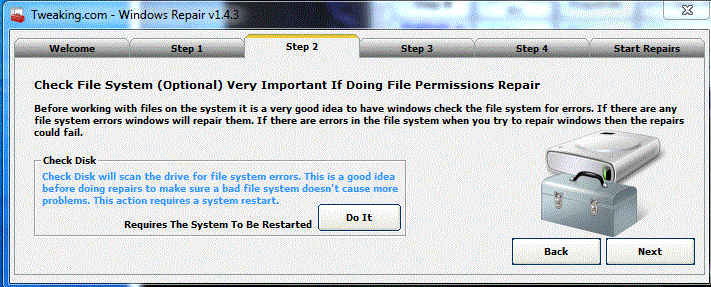
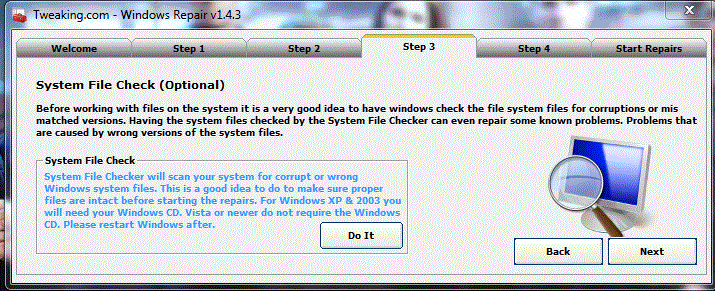
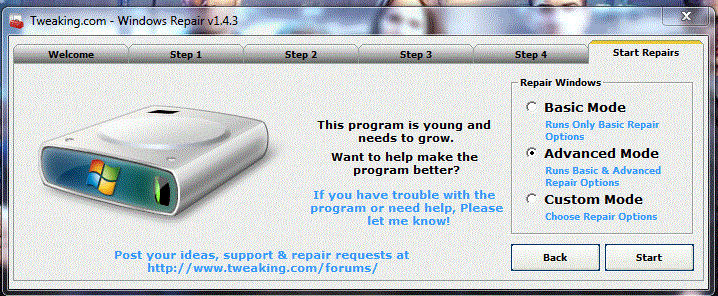
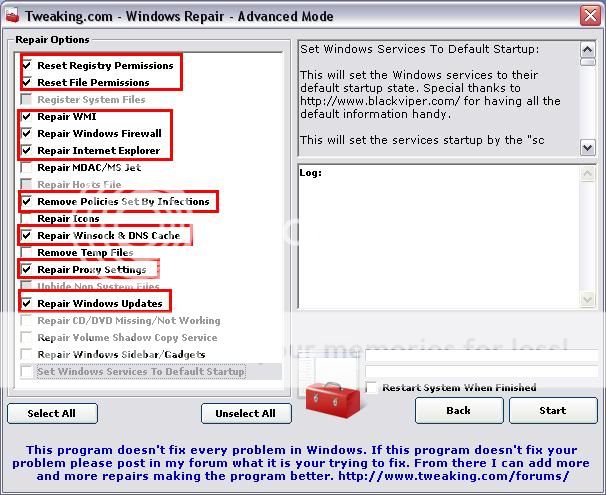
| /// Malwareteam / Visitor | W32/Patched.UC' [virus] in 'C:\Windows\System32\services.exe Bleibt nur diese uberig: Downloade dir bitte Windows Repair (All In One) von hier.
|
|
17.05.2013, 15:29
| #23 |
| | W32/Patched.UC' [virus] in 'C:\Windows\System32\services.exe Also mir hats schon bei Step 3 angezeigt das der Vorgang nicht zuende geführt werden konnte und bei Start Repairs kann ich keinen Modus auswählen. Es wird dann nur gesagt ob ich vorher ein Backup gemacht habe :S |
|
17.05.2013, 15:39
| #24 |
| | W32/Patched.UC' [virus] in 'C:\Windows\System32\services.exe Hab mal screens gemacht |
|
17.05.2013, 15:42
| #25 |
| /// Malwareteam / Visitor | W32/Patched.UC' [virus] in 'C:\Windows\System32\services.exe Die Programm wird immer durch entwickelt, möglicherweise sieht es etwas anderes aus wie im anleitung. Es gibt auch eine Portable Version: Windows Repair (All-in-One) Portable Download Hoffentlich funktioniert das besser  |
|
17.05.2013, 15:49
| #26 |
| | W32/Patched.UC' [virus] in 'C:\Windows\System32\services.exe Hmm, die andere läuft jetzt grade durch  und scheint auch irgendwas zu reparieren^^ Ich weiß leider nicht wie man den Screen sofort sehen kann, darum als Anhang |
|
17.05.2013, 15:56
| #27 |
| /// Malwareteam / Visitor | W32/Patched.UC' [virus] in 'C:\Windows\System32\services.exe Als Anhang ist Prima  Hoffen, dass es klappen wird Geändert von smeenk (17.05.2013 um 16:02 Uhr) |
|
17.05.2013, 16:04
| #28 |
| | W32/Patched.UC' [virus] in 'C:\Windows\System32\services.exe Sieht zumindest schon mal irgendwie nach weniger aus Code:
ATTFilter Farbar Service Scanner Version: 14-04-2013
Ran by Miyu (administrator) on 17-05-2013 at 17:01:57
Running from "C:\Users\Miyu\Desktop"
Windows 7 Professional Service Pack 1 (X64)
Boot Mode: Normal
****************************************************************
Internet Services:
============
Connection Status:
==============
Localhost is accessible.
LAN connected.
Google IP is accessible.
Google.com is accessible.
Attempt to access Yahoo IP returned error. Yahoo IP is offline
Attempt to access Yahoo.com returned error: Yahoo.com is offline
Windows Firewall:
=============
Firewall Disabled Policy:
==================
System Restore:
============
System Restore Disabled Policy:
========================
Action Center:
============
Windows Update:
============
wuauserv Service is not running. Checking service configuration:
The start type of wuauserv service is OK.
The ImagePath of wuauserv service is OK.
The ServiceDll of wuauserv: "C:\Windows\system32\wuaueng.dll".
Windows Autoupdate Disabled Policy:
============================
Windows Defender:
==============
WinDefend Service is not running. Checking service configuration:
The start type of WinDefend service is OK.
The ImagePath of WinDefend service is OK.
The ServiceDll of WinDefend service is OK.
Windows Defender Disabled Policy:
==========================
[HKEY_LOCAL_MACHINE\SOFTWARE\Microsoft\Windows Defender]
"DisableAntiSpyware"=DWORD:1
Other Services:
==============
Checking Start type of iphlpsvc: ATTENTION!=====> Unable to open iphlpsvc registry key. The service key does not exist.
Checking ImagePath of iphlpsvc: ATTENTION!=====> Unable to open iphlpsvc registry key. The service key does not exist.
Checking ServiceDll of iphlpsvc: ATTENTION!=====> Unable to open iphlpsvc registry key. The service key does not exist.
File Check:
========
C:\Windows\System32\nsisvc.dll => MD5 is legit
C:\Windows\System32\drivers\nsiproxy.sys => MD5 is legit
C:\Windows\System32\dhcpcore.dll => MD5 is legit
C:\Windows\System32\drivers\afd.sys => MD5 is legit
C:\Windows\System32\drivers\tdx.sys => MD5 is legit
C:\Windows\System32\Drivers\tcpip.sys => MD5 is legit
C:\Windows\System32\dnsrslvr.dll => MD5 is legit
C:\Windows\System32\mpssvc.dll => MD5 is legit
C:\Windows\System32\bfe.dll => MD5 is legit
C:\Windows\System32\drivers\mpsdrv.sys => MD5 is legit
C:\Windows\System32\SDRSVC.dll => MD5 is legit
C:\Windows\System32\vssvc.exe => MD5 is legit
C:\Windows\System32\wscsvc.dll => MD5 is legit
C:\Windows\System32\wbem\WMIsvc.dll => MD5 is legit
C:\Windows\System32\wuaueng.dll => MD5 is legit
C:\Windows\System32\qmgr.dll => MD5 is legit
C:\Windows\System32\es.dll => MD5 is legit
C:\Windows\System32\cryptsvc.dll => MD5 is legit
C:\Program Files\Windows Defender\MpSvc.dll
[2009-07-14 01:54] - [2009-07-14 03:41] - 1011712 ____A () D41D8CD98F00B204E9800998ECF8427E
ATTENTION!=====> C:\Program Files\Windows Defender\MpSvc.dll IS INFECTED AND SHOULD BE REPLACED.
C:\Windows\System32\ipnathlp.dll => MD5 is legit
C:\Windows\System32\iphlpsvc.dll => MD5 is legit
C:\Windows\System32\svchost.exe => MD5 is legit
C:\Windows\System32\rpcss.dll => MD5 is legit
**** End of log ****
C:\Windows\system32 allerdings habe ich keine Ahnung was dann zutun wäre :S |
|
17.05.2013, 16:16
| #29 |
| /// Malwareteam / Visitor | W32/Patched.UC' [virus] in 'C:\Windows\System32\services.exe Mal sehen ob Combofix noch etwas Änderung bringt. Scan mit Combofix
|
|
18.05.2013, 08:19
| #30 |
| | W32/Patched.UC' [virus] in 'C:\Windows\System32\services.exe Hat leider etwas gedauert, aber jetzt hab ichs Code:
ATTFilter ComboFix 13-05-16.02 - Miyu 18.05.2013 9:02.1.8 - x64
Microsoft Windows 7 Professional 6.1.7601.1.1252.49.1031.18.16312.13602 [GMT 2:00]
ausgeführt von:: c:\users\Miyu\Desktop\ComboFix.exe
* Neuer Wiederherstellungspunkt wurde erstellt
.
.
(((((((((((((((((((((((((((((((((((( Weitere Löschungen ))))))))))))))))))))))))))))))))))))))))))))))))
.
.
c:\users\Miyu\AppData\Roaming\Microsoft\Network\Connections\Pbk\_hiddenPbk
c:\users\Miyu\AppData\Roaming\Microsoft\Network\Connections\Pbk\_hiddenPbk\rasphone.pbk
c:\windows\SysWow64\URTTemp
c:\windows\SysWow64\URTTemp\regtlib.exe
.
Infizierte Kopie von c:\windows\system32\Services.exe wurde gefunden und desinfiziert
Kopie von - c:\windows\winsxs\amd64_microsoft-windows-s..s-servicecontroller_31bf3856ad364e35_6.1.7600.16385_none_2b54b20ee6fa07b1\services.exe wurde wiederhergestellt
.
.
((((((((((((((((((((((( Dateien erstellt von 2013-04-18 bis 2013-05-18 ))))))))))))))))))))))))))))))
.
.
2013-05-18 07:06 . 2013-05-18 07:06 -------- d-----w- c:\users\Default\AppData\Local\temp
2013-05-18 06:59 . 2013-05-18 07:05 -------- d-----w- c:\windows\system32\catroot2
2013-05-17 14:55 . 2013-05-17 14:56 -------- d-----w- c:\windows\SysWow64\wbem\Performance
2013-05-17 14:27 . 2013-05-17 14:27 -------- d-----w- C:\RegBackup
2013-05-17 14:07 . 2013-05-17 14:58 181064 ----a-w- c:\windows\PSEXESVC.EXE
2013-05-17 13:12 . 2013-05-17 13:54 -------- d-----w- c:\users\Miyu\AppData\Local\JDownloader v2.0
2013-05-17 10:45 . 2013-05-17 10:45 -------- d-----w- c:\programdata\Malwarebytes
2013-05-16 21:48 . 2013-05-18 07:08 -------- d-----w- c:\users\Miyu\AppData\Local\Temp
2013-05-16 20:55 . 2013-05-16 20:54 83160 ----a-w- c:\windows\system32\drivers\avnetflt.sys
2013-05-16 11:08 . 2013-05-16 11:09 -------- d-----w- c:\users\Miyu\AppData\Local\Torch
2013-05-16 10:59 . 2013-05-16 10:59 -------- d-----w- c:\users\Miyu\AppData\Roaming\Media Player Classic
2013-05-16 10:21 . 2013-05-16 10:21 225280 ----a-w- c:\programdata\Microsoft\Media Tools\MediaIconsOverlays.dll
2013-05-16 09:01 . 2013-05-16 11:11 -------- d-----w- c:\users\Miyu\AppData\Roaming\uTorrent
2013-05-11 10:37 . 2013-05-11 10:37 209472 ----a-w- c:\program files (x86)\Internet Explorer\Plugins\nppdf32.dll
2013-05-05 01:42 . 2013-05-05 01:42 -------- d-----w- c:\program files (x86)\Common Files\Java
2013-05-05 01:42 . 2013-05-05 01:42 95648 ----a-w- c:\windows\SysWow64\WindowsAccessBridge-32.dll
2013-05-03 18:45 . 2013-05-03 18:45 -------- d-----w- c:\users\Miyu\AppData\Roaming\raidcall
2013-05-03 18:45 . 2013-05-03 19:42 -------- d-----w- c:\program files (x86)\RaidCall
2013-04-28 20:50 . 2013-04-28 20:50 -------- d-----w- c:\users\Miyu\AppData\Local\Programs
2013-04-28 20:49 . 2013-04-28 20:49 -------- d-----w- c:\users\Miyu\AppData\Local\Google
2013-04-28 13:25 . 2013-04-28 13:25 -------- d-----w- c:\users\Miyu\AppData\Roaming\TERA
.
.
.
(((((((((((((((((((((((((((((((((((( Find3M Bericht ))))))))))))))))))))))))))))))))))))))))))))))))))))))
.
2013-05-16 20:50 . 2011-03-28 17:36 22240 ----a-w- c:\programdata\Microsoft\IdentityCRL\production\ppcrlconfig600.dll
2013-05-15 18:00 . 2012-12-19 12:35 71048 ----a-w- c:\windows\SysWow64\FlashPlayerCPLApp.cpl
2013-05-15 18:00 . 2012-12-19 12:35 692104 ----a-w- c:\windows\SysWow64\FlashPlayerApp.exe
2013-05-05 01:42 . 2012-12-27 22:08 866720 ----a-w- c:\windows\SysWow64\npdeployJava1.dll
2013-05-05 01:42 . 2012-12-27 13:48 788896 ----a-w- c:\windows\SysWow64\deployJava1.dll
2013-03-29 07:03 . 2013-03-29 07:04 28600 ----a-w- c:\windows\system32\drivers\avkmgr.sys
2013-03-29 07:03 . 2013-03-29 07:04 130016 ----a-w- c:\windows\system32\drivers\avipbb.sys
2013-03-29 07:03 . 2013-03-29 07:04 100712 ----a-w- c:\windows\system32\drivers\avgntflt.sys
.
.
(((((((((((((((((((((((((((( Autostartpunkte der Registrierung ))))))))))))))))))))))))))))))))))))))))
.
.
*Hinweis* leere Einträge & legitime Standardeinträge werden nicht angezeigt.
REGEDIT4
.
[HKEY_CURRENT_USER\SOFTWARE\Microsoft\Windows\CurrentVersion\Run]
"Pando Media Booster"="c:\program files (x86)\Pando Networks\Media Booster\PMB.exe" [2012-12-26 3093624]
"EPLTarget\P0000000000000000"="c:\windows\system32\spool\DRIVERS\x64\3\E_YATIIXE.EXE" [2012-02-28 283232]
"EPLTarget\P0000000000000001"="c:\windows\system32\spool\DRIVERS\x64\3\E_YATIIXE.EXE" [2012-02-28 283232]
"Steam"="c:\program files (x86)\Steam\Steam.exe" [2013-05-03 1635752]
"Facebook Update"="c:\users\Miyu\AppData\Local\Facebook\Update\FacebookUpdate.exe" [2013-03-09 138096]
.
[HKEY_LOCAL_MACHINE\SOFTWARE\Wow6432Node\Microsoft\Windows\CurrentVersion\Run]
"avgnt"="c:\program files (x86)\Avira\AntiVir Desktop\avgnt.exe" [2013-05-16 345312]
"APSDaemon"="c:\program files (x86)\Common Files\Apple\Apple Application Support\APSDaemon.exe" [2012-11-28 59280]
"QuickTime Task"="c:\program files (x86)\QuickTime\QTTask.exe" [2012-10-25 421888]
"Adobe ARM"="c:\program files (x86)\Common Files\Adobe\ARM\1.0\AdobeARM.exe" [2013-04-04 958576]
"iTunesHelper"="d:\programme\iTunesHelper.exe" [2012-12-12 152544]
"FUFAXRCV"="c:\program files (x86)\Epson Software\FAX Utility\FUFAXRCV.exe" [2012-04-03 502912]
"FUFAXSTM"="c:\program files (x86)\Epson Software\FAX Utility\FUFAXSTM.exe" [2012-04-03 863360]
"EEventManager"="c:\program files (x86)\Epson Software\Event Manager\EEventManager.exe" [2012-04-02 1058912]
"StartCCC"="c:\program files (x86)\ATI Technologies\ATI.ACE\Core-Static\CLIStart.exe" [2012-12-19 642808]
"SunJavaUpdateSched"="c:\program files (x86)\Common Files\Java\Java Update\jusched.exe" [2013-03-12 253816]
.
c:\users\Miyu\AppData\Roaming\Microsoft\Windows\Start Menu\Programs\Startup\
OpenOffice.org 3.3.lnk - f:\wegen formatieren\OpenOffice.org 3\program\quickstart.exe [N/A]
OpenOffice.org 3.4.1.lnk - c:\program files (x86)\OpenOffice.org 3\program\quickstart.exe [2012-8-13 1199104]
.
[HKEY_LOCAL_MACHINE\software\microsoft\windows\currentversion\policies\system]
"ConsentPromptBehaviorAdmin"= 5 (0x5)
"ConsentPromptBehaviorUser"= 3 (0x3)
"EnableUIADesktopToggle"= 0 (0x0)
.
[HKEY_LOCAL_MACHINE\software\microsoft\windows nt\currentversion\winlogon]
"Userinit"="userinit.exe"
.
[HKEY_LOCAL_MACHINE\software\wow6432node\microsoft\windows nt\currentversion\windows]
"LoadAppInit_DLLs"=1 (0x1)
.
[HKEY_LOCAL_MACHINE\software\wow6432node\microsoft\windows nt\currentversion\drivers32]
"aux1"=wdmaud.drv
.
R2 clr_optimization_v4.0.30319_64;Microsoft .NET Framework NGEN v4.0.30319_X64;c:\windows\Microsoft.NET\Framework64\v4.0.30319\mscorsvw.exe [2010-03-18 138576]
R3 ALSysIO;ALSysIO;c:\users\Miyu\AppData\Local\Temp\ALSysIO64.sys [x]
R3 TsUsbFlt;TsUsbFlt;c:\windows\system32\drivers\tsusbflt.sys [2010-11-20 59392]
S0 amd_sata;amd_sata;c:\windows\system32\DRIVERS\amd_sata.sys [2012-02-29 82560]
S0 amd_xata;amd_xata;c:\windows\system32\DRIVERS\amd_xata.sys [2012-02-29 42624]
S1 avkmgr;avkmgr;c:\windows\system32\DRIVERS\avkmgr.sys [2013-03-29 28600]
S2 AMD External Events Utility;AMD External Events Utility;c:\windows\system32\atiesrxx.exe [2012-12-19 240640]
S2 AMD FUEL Service;AMD FUEL Service;c:\program files\ATI Technologies\ATI.ACE\Fuel\Fuel.Service.exe [2012-12-19 361984]
S2 AntiVirSchedulerService;Avira Planer;c:\program files (x86)\Avira\AntiVir Desktop\sched.exe [2013-03-29 86752]
S2 AODDriver4.2;AODDriver4.2;c:\program files\ATI Technologies\ATI.ACE\Fuel\amd64\AODDriver2.sys [2012-04-09 57472]
S2 EPSON_PM_RPCV4_05;EPSON V3 Service4(05);c:\program files\Common Files\EPSON\EPW!3 SSRP\E_WT50RP.EXE [2012-02-27 151648]
S2 EpsonScanSvc;Epson Scanner Service;c:\windows\system32\EscSvc64.exe [2011-12-11 135824]
S3 asmthub3;ASMedia USB3 Hub Service;c:\windows\system32\DRIVERS\asmthub3.sys [2011-11-03 130536]
S3 asmtxhci;ASMEDIA XHCI Service;c:\windows\system32\DRIVERS\asmtxhci.sys [2011-11-03 395752]
S3 AtiHDAudioService;AMD Function Driver for HD Audio Service;c:\windows\system32\drivers\AtihdW76.sys [2012-11-06 96256]
S3 RTL8167;Realtek 8167 NT Driver;c:\windows\system32\DRIVERS\Rt64win7.sys [2012-06-12 726160]
S3 usbfilter;AMD USB Filter Driver;c:\windows\system32\DRIVERS\usbfilter.sys [2011-12-13 56448]
.
.
--- Andere Dienste/Treiber im Speicher ---
.
*NewlyCreated* - WS2IFSL
.
Inhalt des "geplante Tasks" Ordners
.
2013-05-18 c:\windows\Tasks\Adobe Flash Player Updater.job
- c:\windows\SysWOW64\Macromed\Flash\FlashPlayerUpdateService.exe [2012-12-19 18:00]
.
2013-05-16 c:\windows\Tasks\FacebookUpdateTaskUserS-1-5-21-1589193222-955252371-806738954-1000Core.job
- c:\users\Miyu\AppData\Local\Facebook\Update\FacebookUpdate.exe [2013-03-09 16:30]
.
2013-05-18 c:\windows\Tasks\FacebookUpdateTaskUserS-1-5-21-1589193222-955252371-806738954-1000UA.job
- c:\users\Miyu\AppData\Local\Facebook\Update\FacebookUpdate.exe [2013-03-09 16:30]
.
.
--------- X64 Entries -----------
.
.
[HKEY_LOCAL_MACHINE\SOFTWARE\Microsoft\Windows\CurrentVersion\Run]
"RTHDVCPL"="c:\program files\Realtek\Audio\HDA\RtkNGUI64.exe" [2012-06-12 6548112]
.
------- Zusätzlicher Suchlauf -------
.
uLocal Page = c:\windows\system32\blank.htm
uStart Page = hxxp://www.google.com
mLocal Page = c:\windows\SysWOW64\blank.htm
IE: &Citavi Picker... - file://c:\programdata\Swiss Academic Software\Citavi Picker\Internet Explorer\ShowContextMenu.html
TCP: DhcpNameServer = 192.168.178.1
FF - ProfilePath - c:\users\Miyu\AppData\Roaming\Mozilla\Firefox\Profiles\bqji94cx.default\
.
- - - - Entfernte verwaiste Registrierungseinträge - - - -
.
Wow6432Node-HKCU-Run-StickyPassword - c:\program files (x86)\Sticky Password\stpass.exe
Wow6432Node-HKLM-Run-DivXMediaServer - c:\program files (x86)\DivX\DivX Media Server\DivXMediaServer.exe
Wow6432Node-HKLM-Run-DivXUpdate - c:\program files (x86)\DivX\DivX Update\DivXUpdate.exe
SafeBoot-54195540.sys
ShellIconOverlayIdentifiers-{1EC23CFF-4C58-458f-924C-8519AEF61B32} - (no file)
AddRemove-JDownloader - c:\program files (x86)\JDownloader\uninstall.exe
AddRemove-SP_ccfde35c - c:\program files (x86)\SimpleSpeedy\uninstall.exe
AddRemove-{D921A95F-EA59-78DE-1F2C-1700EDBF24ED} - c:\progra~3\INSTAL~1\{BABFE~1\Setup.exe
.
.
.
--------------------- Gesperrte Registrierungsschluessel ---------------------
.
[HKEY_LOCAL_MACHINE\SOFTWARE\Classes\CLSID\{73C9DFA0-750D-11E1-B0C4-0800200C9A66}]
@Denied: (A 2) (Everyone)
@="FlashBroker"
"LocalizedString"="@c:\\Windows\\system32\\Macromed\\Flash\\FlashUtil64_11_7_700_202_ActiveX.exe,-101"
.
[HKEY_LOCAL_MACHINE\SOFTWARE\Classes\CLSID\{73C9DFA0-750D-11E1-B0C4-0800200C9A66}\Elevation]
"Enabled"=dword:00000001
.
[HKEY_LOCAL_MACHINE\SOFTWARE\Classes\CLSID\{73C9DFA0-750D-11E1-B0C4-0800200C9A66}\LocalServer32]
@="c:\\Windows\\system32\\Macromed\\Flash\\FlashUtil64_11_7_700_202_ActiveX.exe"
.
[HKEY_LOCAL_MACHINE\SOFTWARE\Classes\CLSID\{73C9DFA0-750D-11E1-B0C4-0800200C9A66}\TypeLib]
@="{FAB3E735-69C7-453B-A446-B6823C6DF1C9}"
.
[HKEY_LOCAL_MACHINE\SOFTWARE\Classes\Interface\{6AE38AE0-750C-11E1-B0C4-0800200C9A66}]
@Denied: (A 2) (Everyone)
@="IFlashBroker5"
.
[HKEY_LOCAL_MACHINE\SOFTWARE\Classes\Interface\{6AE38AE0-750C-11E1-B0C4-0800200C9A66}\ProxyStubClsid32]
@="{00020424-0000-0000-C000-000000000046}"
.
[HKEY_LOCAL_MACHINE\SOFTWARE\Classes\Interface\{6AE38AE0-750C-11E1-B0C4-0800200C9A66}\TypeLib]
@="{FAB3E735-69C7-453B-A446-B6823C6DF1C9}"
"Version"="1.0"
.
------------------------ Weitere laufende Prozesse ------------------------
.
c:\windows\DAODx.exe
c:\program files (x86)\Common Files\Adobe\ARM\1.0\armsvc.exe
c:\program files (x86)\Avira\AntiVir Desktop\avguard.exe
c:\program files (x86)\Common Files\Apple\Mobile Device Support\AppleMobileDeviceService.exe
d:\programme\CPUCooL\CooLSrv.exe
.
**************************************************************************
.
Zeit der Fertigstellung: 2013-05-18 09:12:56 - PC wurde neu gestartet
ComboFix-quarantined-files.txt 2013-05-18 07:12
.
Vor Suchlauf: 9.256.005.632 Bytes frei
Nach Suchlauf: 8.996.192.256 Bytes frei
.
- - End Of File - - 283997FCDBE7531C282B63AB895CBBDF
|
|
| Themen zu W32/Patched.UC' [virus] in 'C:\Windows\System32\services.exe |
| adobe, browser, c:\windows\system32\services.exe, explorer, firefox, flash player, helper, internet, internet explorer, log file, mozilla, pando media booster, problem, recycle.bin, registry, rootkit, search the web, services.exe, software, starten, system, tarma, temp, torntv.com, virus.win64.zaccess.a, w32/patched.uc, w32/patched.uc' [virus] in 'c:\windows\system32\services.exe, windows |

![W32/Patched.UC' [virus] in 'C:\Windows\System32\services.exe](iconimages/log-analyse-auswertung/w32-patched-uc-virus-c-windows-system32-services-exe_ltr.gif)
 WARNUNG an die MITLESER:
 Linear-Darstellung

