Zurück   Trojaner-Board > Sicherheit > Anleitungen, FAQs & Links

Anleitungen, FAQs & Links: Master Utilities entfernen

Windows 7 Hilfreiche Anleitungen, FAQs & Links zum Thema Sicherheit und mehr. Nur lesen, kein posten möglich!

Antwort
Alt 10.09.2011, 16:10   #1
AdminBot
Administrator
 
Master Utilities entfernen - Standard Master Utilities entfernen

Master Utilities entfernen


Was ist Master Utilities?
Master Utilities ist eine weitere Rogue-Malware in Form einer gefälschten Scan-Software, die mittels eines sog. Trojaners in den PC eindringt und dem Benutzer weissmacht, den PC nach Malware abzusuchen. Diese Software (Master Utilities) ist ein Fake und selbst eine Schadsoftware und sollte nicht gekauft werden.

Da solche Software wie Master Utilities sich gegen jede Entfernung wehren wird und Master Utilities oftmals noch Rootkits mitinstalliert, sollte eine Neuinstallation des Systems in Erwägung gezogen werden.

Verbreitet wird Scareware wie Master Utilities nicht mehr ausschliesslich über 'dubiose Seiten' für Cracks, KeyGens und Warez, sondern auch seriöse Seiten werden zunehmend für die Verbreitung dieser mißbraucht (Drive-by-Installation).

Der wichtigste Schutz vor einer Infizierung ist ein aktuelles Windows (mit allen Updates) und aktuelle Drittanbietersoftware wie Java oder Adobe Flash!


Symptome von Master Utilities:
  • ständige Fake Virenmeldungen von Master Utilities
  • PC läuft seit Master Utilities langsamer als üblich


Fake-Meldungen von Master Utilities:

Hard Drive Failure
The system has detected a problem with one or more installed IDE / SATA hard disks. It is recommended that you restart the system.


System Error
An error occurred while reading system files. Run a system diagnostic utility to check your hard disk drive for errors.


Critical Error
Hard drive critical error. Run a system diagnostic utility to check your hard disk drive for errors. Windows can't find hard disk space. Hard drive error.


Fix Disk
Master Utilities Diagnostics will scan the system to identify performance problems.
Start or Cancel


Master Utilities Diagnostics
Windows detected a hard disk error.
A problem with the hard drive sectors has been detected. It is recommended to download the following sertified <sic> software to fix the detected hard drive problems. Do you want to download recommended software?


Critical Hard Disk Drive Error
Master Utilities detected a bad sector on your hard disk drive.
This error may cause the following problems:

- Data corruption and loss
- Hard drive inaccessibility
- System errors and failures


Requested registry access is not allowed. Registry defragmentation required
Read time of hard drive clusters less than 500 ms
32% of HDD space is unreadable
Bad sectors on hard drive or damaged file allocation table
GPU RAM temperature is critically high. Urgent RAM memory optimization is required to prevent system crash
Drive C initializing error
Ram Temperature is 83 C. Optimization is required for normal operation.
Hard drive doesn't respond to system commands
Data Safety Problem. System integrity is at risk.
Registry Error - Critical Error


Critical Error!
Damaged hard drive clusters detected. Private data is at risk.

Critical Error
Hard Drive not found. Missing hard drive.

Critical Error
RAM memory usage is critically high. RAM memory failure.

Critical Error
Windows can't find hard disk space. Hard drive error

Critical Error!
Windows was unable to save all the data for the file \System32\496A8300. The data has been lost. This error may be caused by a failure of your computer hardware.

Critical Error
A critical error has occurred while indexing data stored on hard drive. System restart required.

System Restore
The system has been restored after a critical error. Data integrity and hard drive integrity verification required.

Activation Reminder
Master Utilities Activation
Advanced module activation required to fix detected errors and performance issues. Please purchase Advanced Module license to activate this software and enable all features.

Low Disk Space
You are running very low disk space on Local Disk (C:).

Windows - No Disk
Exception Processing Message 0x0000013


Dateien von Master Utilities:
Code:
%LocalAppData%\<zufällig>
%LocalAppData%\<zufällig>.exe
%LocalAppData%\~<zufällig>
%StartMenu%\Programs\Master Utilities\
%StartMenu%\Programs\Master Utilities\Master Utilities.lnk
%StartMenu%\Programs\Master Utilities\Uninstall Master Utilities.lnk
%Temp%\smtmp\
%Temp%\smtmp\1
%Temp%\smtmp\1
%Temp%\smtmp\2
%Temp%\smtmp\3
%Temp%\smtmp\4
%UserProfile%\Desktop\Master Utilities.lnk
         

Registry-Einträge von Master Utilities:
Code:
HKEY_CURRENT_USER\Software\Microsoft\Internet Explorer\Main "Use FormSuggest" = 'Yes'
HKEY_CURRENT_USER\Software\Microsoft\Windows\CurrentVersion\Internet Settings "CertificateRevocation" = '0'
HKEY_CURRENT_USER\Software\Microsoft\Windows\CurrentVersion\Internet Settings "WarnonBadCertRecving" = '0'
HKEY_CURRENT_USER\Software\Microsoft\Windows\CurrentVersion\Policies\ActiveDesktop "NoChangingWallPaper" = '1'
HKEY_CURRENT_USER\Software\Microsoft\Windows\CurrentVersion\Policies\Associations "LowRiskFileTypes" = '/{hq:/s`s:/ogn:/uyu:/dyd:/c`u:/bnl:/ble:/sdf:/lrh:/iul:/iulm:/fhg:/clq:/kqf:/`wh:/lqf:/lqdf:/lnw:/lq2:/l2t:/v`w:/rbs:'
HKEY_CURRENT_USER\Software\Microsoft\Windows\CurrentVersion\Policies\Attachments "SaveZoneInformation" = '1'
HKEY_CURRENT_USER\Software\Microsoft\Windows\CurrentVersion\Policies\Explorer "NoDesktop" = '1'
HKEY_CURRENT_USER\Software\Microsoft\Windows\CurrentVersion\Policies\System "DisableTaskMgr" = '1'
HKEY_CURRENT_USER\Software\Microsoft\Windows\CurrentVersion\Run "<zufällig>.exe"
HKEY_CURRENT_USER\Software\Microsoft\Windows\CurrentVersion\Run "<zufällig>"
HKEY_LOCAL_MACHINE\SOFTWARE\Microsoft\Windows\CurrentVersion\policies\system "DisableTaskMgr" = '1'
HKEY_CURRENT_USER\Software\Microsoft\Internet Explorer\Download "CheckExeSignatures" = 'no'
HKEY_CURRENT_USER\Software\Microsoft\Windows\CurrentVersion\Explorer\Advanced "Hidden" = '0'
HKEY_CURRENT_USER\Software\Microsoft\Windows\CurrentVersion\Explorer\Advanced "ShowSuperHidden" = '0'
HKEY_CURRENT_USER\Software\Microsoft\Windows\CurrentVersion\Explorer\ComDlg32\LastVisitedMRU "MRUList"
         

Master Utilities im HijackThis-Log:
Code:
O4 - HKCU\..\Run: [<zufällig>.exe] %LocalAppData%\<zufällig>.exe
O4 - HKCU\..\Run: [<zufällig>] %LocalAppData%\<zufällig>.exe
         
Miniaturansicht angehängter Grafiken
Master Utilities entfernen-1.jpg   Master Utilities entfernen-2.jpg   Master Utilities entfernen-3.jpg   Master Utilities entfernen-4.jpg  

Alt 10.09.2011, 16:22   #2
Da GuRu
Administrator
/// technical service
 

Master Utilities entfernen - Standard

Master Utilities entfernen


Master Utilities entfernen


  • Tool: rkill.com Download Link (umbenannt: iExplore.exe) von Grinler herunterladen und mit doppelklick ausführen.

    Sollte rkill.com nicht starten, versuche es mit einer umbenannten Version wie iExplore.exe


    RKILL


    Das Tool stoppt alle Prozesse von Master Utilities.

    Bei Bedarf mehrmals ausführen, bis alle ungewünschten Prozesse beendet wurden.


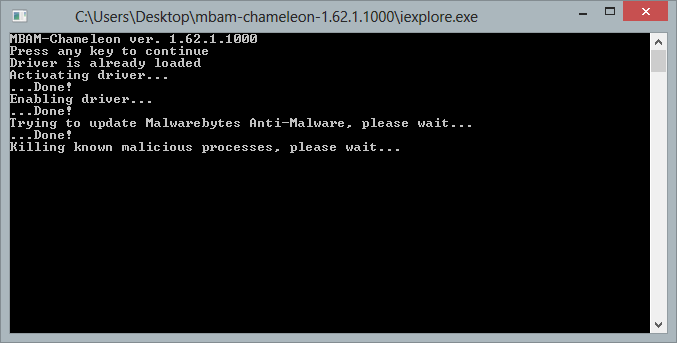
Achtung: Diese Fake Software (Master Utilities) wird versuchen, den Einsatz von Malwarebytes zu verhindern. Benenne das Setup vor dem speichern in etwas anderes um (z.B. Herbert.exe).

Falls es vorher nicht funktioniert hat, sollte das Setup jetzt starten.

Wenn das Programm nach der Installation nicht starten sollte, dann benenne die "mbam.exe" in "herbert.exe" um und versuche es erneut.

Sollte MBAM trotzdem nicht starten: Malwarebytes Anti-Malware startet nicht

Malwarebytes Anti-Malware


Alt 10.09.2011, 17:32   #3
AdminBot
Administrator
 
Master Utilities entfernen - Standard Master Utilities entfernen


Master Utilities immer noch nicht entfernt?
OTH - OTHelper - Kill All Processes


Mit aktualisiertem (!!) Malwarebytes Anti-Malware nach Ausführen von OTH nochmal QUICKSCAN ausführen.


Weitergehende Prüfung
Das System könnte noch nicht vollständig sauber sein.

Daher unbedingt ein Thema erstellen: Für alle Hilfesuchenden! Was muss ich vor der Eröffnung eines Themas beachten?

Nicht vergessen mit OTL Logfiles....


Antwort

Stichworte zu Master Utilities entfernen
critical error, critical hard disk drive error, data corruption and loss, exception processing message 0x0000013, hard drive critical error., hard drive failure, hard drive inaccessibility, master utilities, master utilities entfernen, segment load failure, system error, windows - no disk, windows detected a hard disk error.


Ähnliche Themen: Master Utilities entfernen


  1. TuneUp Utilities
    Diskussionsforum - 23.01.2012 (31)
  2. Windows Armour Master entfernen
    Anleitungen, FAQs & Links - 21.07.2011 (2)
  3. Windows Test Master entfernen
    Anleitungen, FAQs & Links - 06.07.2011 (2)
  4. Security Master AV entfernen
    Anleitungen, FAQs & Links - 30.05.2010 (2)
  5. Backdor.Win32.Agent im Master Boot Record
    Plagegeister aller Art und deren Bekämpfung - 23.04.2009 (1)
  6. TuneUp Utilities?
    Diskussionsforum - 01.09.2008 (24)
  7. Tune UP Utilities
    Diskussionsforum - 24.03.2008 (13)
  8. VIA bus master IDE drivers
    Alles rund um Windows - 06.08.2006 (6)
  9. Norton Utilities 2002 defekt kann nicht gelöscht werden
    Antiviren-, Firewall- und andere Schutzprogramme - 18.03.2006 (3)
  10. Secondary Master Phänomen wie am 09.04.2005
    Netzwerk und Hardware - 05.09.2005 (1)
  11. Low-Level utilities
    Netzwerk und Hardware - 23.01.2005 (4)
  12. Master Boot Record zerschossen?
    Alles rund um Mac OSX & Linux - 11.02.2004 (2)
  13. Hacker Utilities 1.1
    Alles rund um Windows - 19.08.2003 (7)
  14. Utilities
    Alles rund um Windows - 22.04.2003 (8)

Zum Thema Master Utilities entfernen - Master Utilities entfernen Was ist Master Utilities? Master Utilities ist eine weitere Rogue-Malware in Form einer gefälschten Scan-Software, die mittels eines sog. Trojaners in den PC eindringt und dem Benutzer Windows 7 Master Utilities entfernen...
Archiv
Du betrachtest: Master Utilities entfernen auf Trojaner-Board